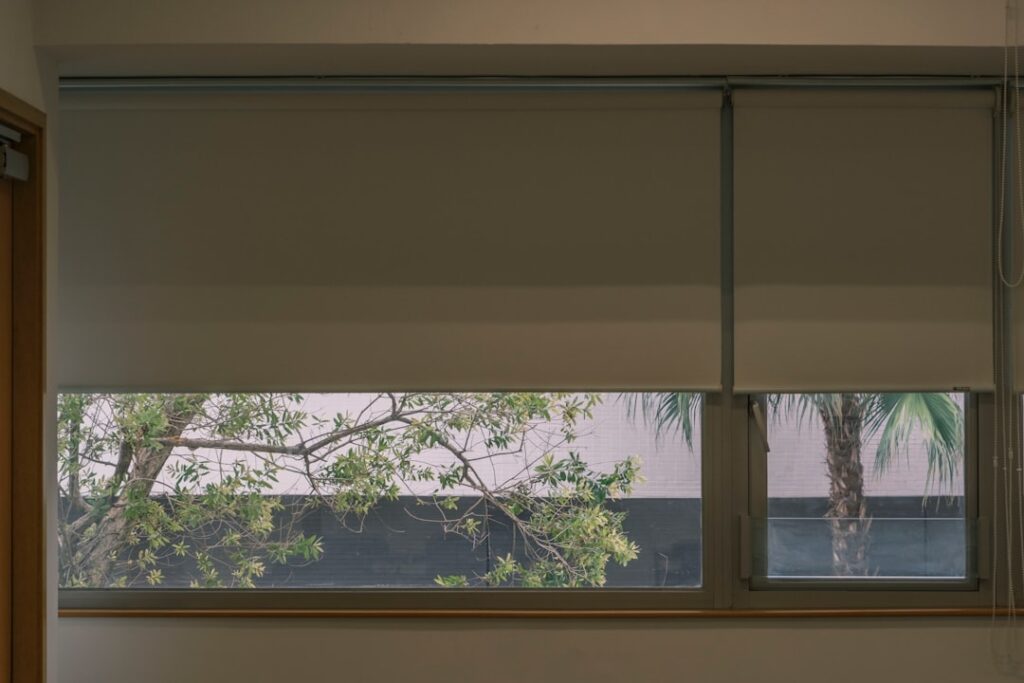
The first time your living room shades glide up on their own at sunrise and lower at dusk, you realize how much of home automation is really about small daily conveniences. Smart roller shades bring motorized, app-controlled, and schedule-driven operation to the simplest and most versatile window covering there is. They roll a single panel of fabric up and down a tube, but adding a quiet motor and a wireless brain turns that basic mechanism into a system that manages light, privacy, and even your heating and cooling bill without you lifting a finger.
This guide breaks down how smart roller shades work, the difference between battery and wired motors, which control ecosystems to look for, and what the whole setup actually costs so you can automate your windows without overpaying.
How Smart Roller Shades Work
At their core, smart roller shades are a fabric panel wound on a hollow tube, with a small electric motor tucked inside that tube. When triggered by a remote, an app, a voice command, or a schedule, the motor rotates the tube to raise or lower the fabric. A control hub or built-in radio connects the shade to your home network so it can respond to commands from anywhere.
The magic is in the automation layer. You can set shades to open at sunrise, close when a temperature sensor says a room is overheating, or drop for privacy at a fixed evening time. Because roller shades use a single flat fabric, the motor’s job is simple and reliable, which is one reason rollers are the most common smart-shade style.
Battery Versus Wired Motors
The power source is the biggest practical decision, since it affects both installation difficulty and long-term upkeep.
- Rechargeable battery: A lithium battery inside the tube powers the motor, recharged every few months via USB. Easiest to install with no wiring.
- Solar-assisted: A small panel keeps the internal battery topped off, stretching recharge intervals to a year or more on a sunny window.
- Hardwired (DC low-voltage): A permanent power line runs to the motor, so the shade never needs charging. Best for hard-to-reach or high windows.
Battery motors are the go-to for retrofits because you avoid running wires and patching walls. The tradeoff is periodic recharging, which means taking the shade down or reaching a charging port a few times a year. For a whole-home installation or tall windows, hardwired motors save the recharging chore but require an electrician or new construction access.
Control Ecosystems and Compatibility
How your shades talk to the rest of your home determines how useful they’ll be. Some shades use their own hub and app; others speak common smart-home protocols directly.
Look for compatibility with the major voice platforms so you can say a command and have the shades respond, and check whether the shades support Matter or a widely used protocol like Zigbee, Z-Wave, or Thread. Shades that plug into a broad ecosystem let you build routines that combine them with lights, thermostats, and locks, for example a “goodnight” scene that lowers every shade and dims the lights at once.
Avoid shades locked to a proprietary app with no integrations if you want true automation, since those become isolated islands. A shade that works with a common hub can be scheduled by sunrise and sunset, triggered by sensors, and controlled remotely when you’re away, which is where the real value lives.
Fabric and Opacity Choices
The motor gets the attention, but the fabric does the actual work of controlling light. Roller shade fabrics fall into a few categories based on how much light they let through.
- Sheer/solar screen: Cuts glare and UV while preserving an outward view; rated by openness, from 1 percent (tight) to 10 percent (open).
- Light-filtering: Softens and diffuses daylight for a bright but private room.
- Blackout: Opaque fabric that blocks nearly all light, ideal for bedrooms and media rooms.
Many homeowners install dual roller shades on one bracket, a solar screen paired with a blackout, so a single window can go from daytime glare control to full darkness at night. It costs more but delivers the most flexibility, especially in bedrooms that double as offices.
Energy Savings and Practical Benefits
Beyond convenience, automated shades can trim energy costs by managing solar heat. Set south- and west-facing shades to lower during peak afternoon sun in summer, and they block heat before it enters, easing the load on your air conditioner. In winter, program them to open on sunny days to capture free solar warmth and close at night to slow heat loss through the glass.
Done across a home, this passive management adds up, particularly on large or numerous windows. Smart shades also boost security by making a home look occupied when you’re away, opening and closing on a realistic schedule rather than sitting frozen in one position for a week.
What Smart Roller Shades Cost
Pricing varies with size, fabric, and motor type. A single battery-powered smart roller shade typically runs $150 to $400, while larger or blackout shades reach $300 to $600. Hardwired motors and premium designer fabrics push individual shades higher. A control hub, if required, adds $50 to $150 one time.
Motorizing a whole home is where budgets grow: a dozen windows can total $2,500 to $6,000 depending on shade size and quality. Retrofit motor kits that add automation to existing manual roller shades offer a cheaper entry, often $80 to $200 per window, though they can be bulkier than a purpose-built smart shade. Many battery shades install in under 30 minutes with a screwdriver, keeping labor costs to zero for a DIYer.
Installation and Initial Setup
Most battery-powered smart roller shades are genuinely DIY-friendly, installing in about 20 to 30 minutes per window with a drill and a screwdriver. The brackets mount either inside the window frame for a clean recessed look or on the wall above and outside the frame for maximum light blockage. Inside mount requires a frame deep enough to hold the roller tube, usually about 2.5 to 3 inches, so measure the depth before choosing.
Accurate measuring is the make-or-break step. For an inside mount, measure the exact window width at the top, middle, and bottom and use the narrowest reading, then subtract the small deduction the manufacturer specifies so the shade clears the frame. After mounting, the setup involves charging the battery, pairing the shade to its hub or your network, and programming the upper and lower travel limits so the shade stops exactly where you want at the top and bottom. Take the time to set those limits precisely, since a shade that stops short leaves a light gap and one that overtravels can bunch the fabric. Once paired, group shades by room in the app so you can control a whole room with one tap and build schedules around sunrise and sunset.
Troubleshooting Common Issues
Smart shades are reliable, but a few issues crop up often enough to know the fixes. The most common is a shade that stops responding, usually because the battery has drained; recharge it and confirm the app shows a healthy charge level. If a shade drifts out of alignment or no longer stops at the right spot, recalibrate the travel limits, which resets its position memory.
Connectivity problems typically trace to weak signal between the shade and its hub. Keep the hub reasonably close to the shades, and remember that thick walls, metal, and distance all cut range; adding a repeater or relocating the hub often solves a shade that keeps dropping offline. If a schedule stops firing, check that the hub still has power and internet, since cloud-based schedules fail when the connection drops. For shades that move slowly or strain, inspect the fabric for binding and make sure nothing on the sill blocks the roll. Keeping firmware updated through the app also resolves many quirks, since manufacturers push fixes that improve motor behavior and integration reliability over time.
Are Smart Roller Shades Worth It?
If you value convenience, want to protect furniture and floors from UV, or aim to shave summer cooling costs, smart roller shades deliver on all three. Start with the windows where automation helps most, hard-to-reach skylights aside, the bedrooms, the sun-blasted west-facing rooms, and the tall windows you never bother adjusting.
Choose battery motors for easy retrofits, favor shades that plug into a broad smart-home ecosystem, and pair solar-screen and blackout fabrics where you need both view and darkness. Set up that way, smart roller shades quietly manage your windows every day, saving energy and adding comfort long after the novelty of watching them move on their own wears off.