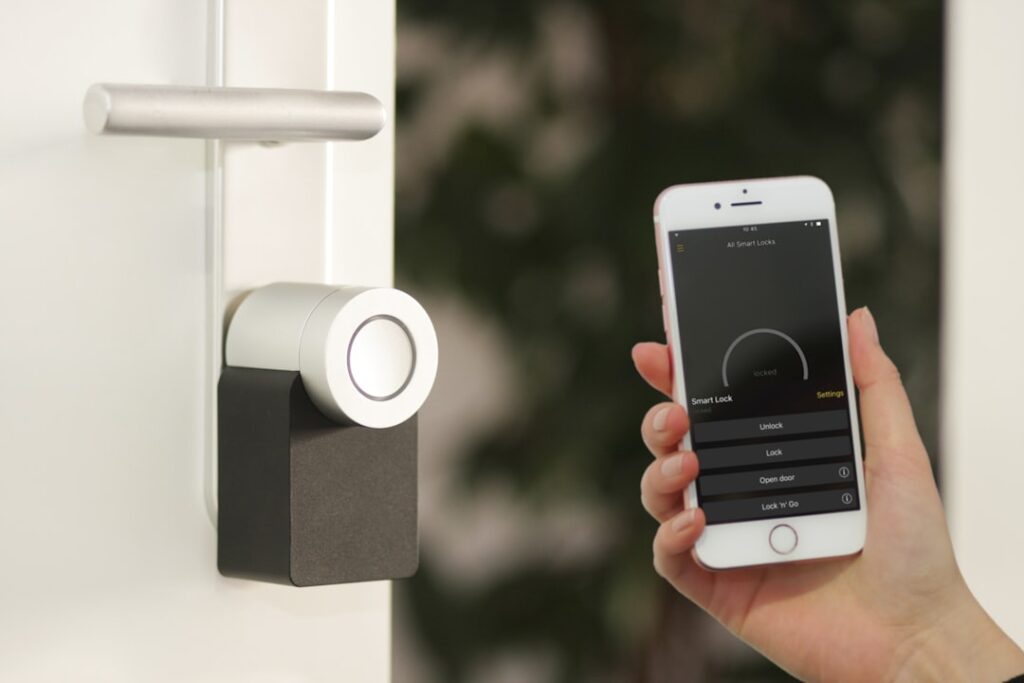
The Eufy Smart Lock E31 is Anker’s answer to buyers who want a fast fingerprint deadbolt that also plugs into the Matter smart-home standard, usually for somewhere between $180 and $230 depending on sales and bundles. It sits a notch above the older E30 in features and slots into the crowded fingerprint-lock market against names like Ultraloq and Aqara. To be clear up front: the E31 is not a video lock. It is a fingerprint, keypad, and app deadbolt, and that focus keeps it reliable at what it does.
Below is a grounded look at what the E31 actually delivers, how it installs, how long the batteries last, and the trade-offs worth weighing before you swap out your front-door hardware.
What Sets the E31 Apart
Eufy’s pitch centers on speed and privacy. The fingerprint sensor is genuinely quick, and Anker has long marketed the roughly 0.3-second unlock time. In practice, from finger-on-sensor to bolt-retracted, real doors land closer to under a second, which still feels instant when your arms are full.
Core capabilities on the E31 include:
- Fingerprint scanner: Stores dozens of prints, fast capacitive read, mounted in the exterior keypad
- Backlit keypad: PIN codes including temporary and scheduled guest codes
- App control: Bluetooth locally; Wi-Fi and remote access via the included or bundled bridge on Wi-Fi versions
- Matter support: Works across Apple Home, Google Home, and Amazon Alexa through Matter
- Physical key: Traditional keyway retained as a fallback
Matter is the meaningful upgrade here. Rather than being locked into one ecosystem, you can control the E31 from whichever platform your household already uses, and add it to routines like “good night” scenes that also dim lights and arm cameras.
Retrofit or Full Replacement?
One of the most common questions is whether the E31 keeps your existing keys. Unlike a retrofit conversion kit that mounts only on the inside and reuses your current deadbolt and keys, the E31 is a full deadbolt replacement. You remove the old lock entirely and install Eufy’s exterior keypad and interior assembly.
That distinction matters:
- Full replacement (E31): New keyway and keys, integrated fingerprint keypad outside, cleaner single-brand look
- Retrofit kit (other brands): Keeps your existing keys and exterior hardware, motorizes the interior thumbturn only
If you rent, or you love your existing exterior hardware and just want app control, a retrofit lock may suit you better. If you want fingerprint entry on the outside of the door, you need a full-replacement lock like the E31, because the sensor has to live on the exterior.
Installation: About Half an Hour
Installing the E31 is a standard deadbolt swap that fits most US exterior doors 1-3/8 to 1-3/4 inches thick, with a 2-3/8 or 2-3/4 inch backset. A Phillips screwdriver is the only tool required.
- Unscrew and remove the old deadbolt, latch, and strike plate
- Adjust the new latch to match your door’s backset and install it
- Mount the exterior keypad, threading the cable through the bolt hole
- Attach the interior body, connect the ribbon cable, and tighten the mounting plate
- Insert the batteries and run in-app calibration so the motor learns locked and unlocked positions
Plan for 25 to 35 minutes if it is your first smart lock. As with any motorized deadbolt, do not skip calibration; a poorly aligned strike plate is the top reason a bolt drags. If the door needs a shove to lock, adjust the strike before blaming the lock.
Battery Life and Charging
Eufy leans on battery endurance as a selling point. The E31 uses a rechargeable battery pack, and Anker rates it for months of use on a charge under typical households, often quoted in the multi-month range. Real numbers depend on how often the motor cycles and whether you use power-hungry features. When it runs low, the app warns you, and you recharge the pack over USB-C rather than hunting for AAs.
Practical tips to stretch runtime:
- Turn off constant Wi-Fi polling if you do not need instant remote status
- Keep the strike plate aligned so the motor is not straining on every cycle
- Recharge fully rather than topping off, and keep a backup key accessible outside
Eufy Smart Lock E31 Pros and Cons
After weighing the specs and living with fingerprint locks generally, here is the honest tally for the Eufy Smart Lock E31:
- Pro: Genuinely fast, accurate fingerprint reads
- Pro: Matter support means real cross-platform flexibility
- Pro: Rechargeable pack avoids constant AA swaps
- Pro: DIY-friendly install with just a screwdriver
- Con: Full replacement only, so you lose your existing keys and it is not renter-friendly
- Con: No built-in camera or video, unlike Eufy’s pricier video-lock line
- Con: Some remote and voice features depend on the Wi-Fi bridge version
- Con: Bulkier interior housing than the sleekest competitors
How the E31 Improves on the E30
Buyers cross-shopping the older E30 want to know what the extra money buys. The two locks share the same core idea, a fingerprint-and-keypad deadbolt, but the E31 tightens several rough edges. The fingerprint module reads more consistently on the first try, the keypad backlighting is cleaner, and the interior housing, while still chunky, feels more refined. Matter support is the through-line on both, but the E31’s firmware and app integration have matured, so onboarding into Apple Home or Google Home tends to be less fiddly than early E30 units were.
If you already own an E30 and it works, there is no urgent reason to upgrade. If you are buying fresh, the E31 is the safer pick for a few extra dollars, and it is the model Eufy is actively supporting with updates going forward.
Guest Codes and Access Logs
Like most quality fingerprint deadbolts, the E31 turns your phone into a key-management console. Through the Eufy Security app you can create and revoke access without ever cutting a physical key:
- Permanent PINs for household members
- Time-limited codes that expire after a weekend or a specific date range
- Recurring schedules for a cleaner or babysitter who visits on set days
- Activity history showing which fingerprint or code opened the door and when
Eufy has built its brand partly on local storage and privacy, so the lock leans toward keeping fingerprint data on the device rather than a cloud server. For privacy-conscious buyers, that is a meaningful selling point over brands that push everything to a remote account by default.
Weather Rating and Everyday Durability
Front-door hardware lives outdoors, so the exterior keypad carries an IP-rated weather seal that shrugs off rain and dust on a typical covered or semi-exposed porch. The fingerprint sensor keeps reading through cold snaps, though as with any capacitive reader, a finger coated in ice or the sensor caked with snow will slow recognition until it is wiped clean. The 1-inch-throw stainless deadbolt meets common residential security grades, and the brushed metal finishes resist the chalky fading that plagues cheaper painted locks after a summer of direct sun.
Should You Buy the E31?
The E31 makes sense if you own your home, want fingerprint entry, and value Matter’s freedom to work with any major smart-home platform. At $180 to $230 it is priced fairly for what it delivers, undercutting premium video locks while beating budget keypads on speed and integration. Confirm you are getting the version with the Wi-Fi bridge if remote unlocking and voice control matter to you, since not every bundle includes it.
Before ordering, verify two things about your door. First, measure the thickness and backset so you buy the right fit; nearly all US exterior doors qualify, but custom slabs occasionally do not. Second, look at your strike plate alignment. A door that has to be pulled tight to lock will fight the motor and drain the battery faster, so a five-minute strike adjustment before installation pays off for years. Also decide up front whether you want the Wi-Fi bridge bundle, because ordering it separately later costs more than getting the right kit the first time.
Skip it if you rent, if you are committed to keeping your current keys, or if you specifically want a camera in your lock. For everyone else, the E31 is a well-rounded fingerprint deadbolt that gets the fundamentals right: a scanner that reads on the first try, batteries you recharge instead of replace, and a standard that will not strand you in one company’s app a few years down the road.