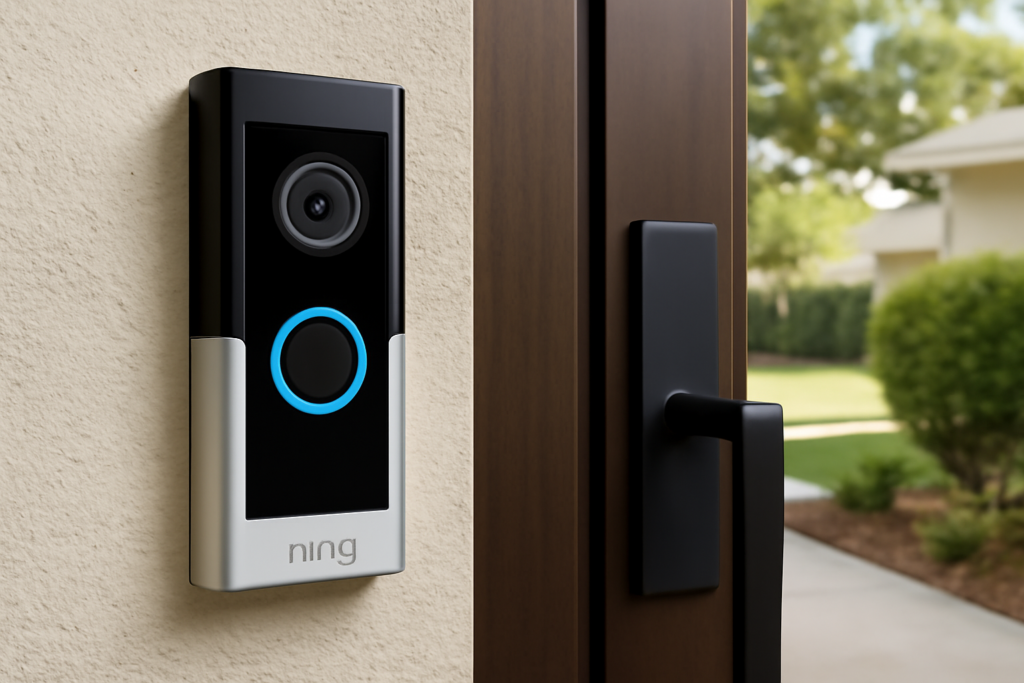
Among the growing crowd of smart doorbells, the ring video doorbell wired pro 2 stands out as the flagship hardwired model, offering features that lower-priced Ring devices simply cannot match. Its headline trick is a head-to-toe camera view that shows packages on your doorstep, plus radar-based motion detection that draws a precise map of where visitors are. If you are deciding whether this is the right doorbell for your home, this guide breaks down what it does, what it requires, what it costs to run, and how to install it.
Part of our Windows & Doors guide — explore the full guide →
- What Makes the Pro 2 Different
- Key Features at a Glance
- Wiring Requirements: The Big Caveat
- Installation Step by Step
- The Subscription Question
- Video and Audio Quality in Practice
- How It Compares
- Privacy Zones and Neighbor Considerations
- Getting the Most From the App
- Common Mistakes to Avoid
- Is It Worth Buying?
What Makes the Pro 2 Different
The single most important upgrade over cheaper Ring models is the aspect ratio of the camera. Most doorbells shoot a roughly square or slightly tall view that cuts off at about waist height for a close visitor. The Pro 2 uses a 1536p HD camera with what Ring calls Head-to-Toe Video, a taller 1:1 field that captures a person from their face all the way down to their feet, and just as importantly, shows packages sitting right against your door.
The second differentiator is 3D Motion Detection with radar. Instead of relying only on the camera to guess where movement is happening, the Pro 2 adds a radar module that measures distance. This lets you set precise detection zones and enables the Bird’s Eye View feature, which overlays a visitor’s path on an aerial map of your property.
Key Features at a Glance
- 1536p HD Head-to-Toe video with a taller aspect ratio for full-length views
- 3D Motion Detection using radar for accurate distance-based zones
- Bird’s Eye View that maps the path a visitor takes
- Color night vision for clearer after-dark footage than black-and-white infrared
- Two-way talk with audio+ noise cancellation for clearer conversations
- Dual-band Wi-Fi (2.4 and 5 GHz) for a more stable connection
- Quick Replies that let a preset voice answer the door when you can’t
Wiring Requirements: The Big Caveat
The word “Wired” in the name is critical. Unlike Ring’s battery models, the Pro 2 must be hardwired to existing doorbell wiring, and it requires a transformer supplying 16 to 24 VAC. Many older homes have a 10 VAC or weaker transformer that will not power the device reliably. Before buying, check your doorbell transformer’s rating, usually a small box near your electrical panel, furnace, or inside a closet.
The Pro 2 also ships with a Pro Power Kit that must be installed at your existing chime to condition the power and make the mechanical or digital chime work correctly. If you have no existing doorbell wiring at all, this is not the model for you; a battery-powered Ring or a Pro Power Kit with a plug-in transformer would be required instead.
Installation Step by Step
For a home with existing, adequate doorbell wiring, installation is a genuine DIY job that takes 30 to 45 minutes.
- Turn off power to the doorbell circuit at the breaker; this is non-negotiable for safety.
- Remove the old doorbell and note the two low-voltage wires.
- Install the Pro Power Kit at your indoor chime, following the wiring diagram in the app for your chime type (mechanical or digital).
- Mount the bracket using the included hardware; a wedge or corner kit adjusts the viewing angle if your door faces the wrong way.
- Connect the two wires to the terminals on the doorbell and snap it onto the bracket.
- Restore power and complete setup in the Ring app, which walks you through Wi-Fi and radar calibration.
The radar calibration step is unique to the Pro 2; you draw your property’s boundaries in the app so the 3D detection knows the layout.
The Subscription Question
Here is the part buyers most often overlook. The doorbell hardware works out of the box for live view and real-time alerts, but recorded video, the whole point of a security camera, requires a Ring Home subscription (formerly Ring Protect). Without it, you cannot review what happened while you were away.
Plans start around $4.99 per month for a single device and roughly $10 to $20 per month for whole-home plans that cover unlimited Ring cameras. Over a few years, the subscription can cost more than the doorbell itself, so factor it into your decision. This ongoing fee is the most common frustration among Ring owners and a fair reason to compare against competitors that offer local storage without a subscription.
Video and Audio Quality in Practice
The 1536p resolution and taller frame genuinely improve real-world usefulness. Package thieves, delivery confirmations, and full-length views of anyone at the door are all noticeably better than on Ring’s 1080p models. Color night vision, which uses ambient light rather than pure infrared, produces more identifiable footage after dark, though it still benefits from a nearby porch light.
Audio+ reduces background noise and echo, making two-way conversations clearer than earlier Ring devices. The radar-driven alerts also cut down on false notifications from passing cars, one of the biggest annoyances with camera-only motion detection.
How It Compares
Within Ring’s lineup, the Pro 2 sits at the top for hardwired devices, above the standard Wired Pro and the battery models. Its main rivals are the Google Nest Doorbell (wired), which offers strong facial recognition and some free video history, and the Eufy and Aqara doorbells, which appeal to buyers who want local storage and no monthly fee. The Pro 2’s edge is its radar-based 3D detection and head-to-toe framing; its weakness is the mandatory subscription for recordings.
Privacy Zones and Neighbor Considerations
A doorbell camera watches the public approach to your home, and being a considerate neighbor matters both socially and, in some areas, legally. The Ring app lets you set Privacy Zones, blacked-out regions of the frame where the camera records nothing, which you should use to mask a neighbor’s front door, window, or yard that falls within view. This keeps your recordings focused on your own property and reduces friction with the people next door.
You can also adjust the motion zones so the doorbell alerts only on activity in your walkway and porch rather than every car and pedestrian passing on the street, which both protects privacy and cuts down on nuisance notifications. In some jurisdictions there are rules about audio recording in particular, since two-way audio can capture conversations, so it is worth a quick check of your local regulations if your doorbell overlooks a shared entry or a public sidewalk. Thoughtful zone setup makes the device more useful and less intrusive at the same time.
Getting the Most From the App
The hardware is only half the product; the Ring app is where the doorbell earns its keep, and a few settings dramatically improve daily use. Set up Quick Replies so the doorbell can automatically greet a visitor and ask them to leave a package when you cannot answer, useful when you are in a meeting or asleep. Enable Rich Notifications, which include a snapshot in the alert so you can see who is there without opening the app.
Take advantage of shared users so household members receive alerts and can answer the door from their own phones, and link the doorbell to any Alexa-enabled Echo devices so announcements play through your speakers and you can view the feed on an Echo Show. Fine-tune the motion sensitivity and schedule, using the radar-based 3D zones, so the system learns your property’s normal traffic and only bothers you with events that matter. Spending fifteen minutes in these settings transforms the doorbell from a noisy gadget into a genuinely helpful part of your home’s security.
Common Mistakes to Avoid
- Skipping the transformer check. An undersized transformer causes dropouts and failed installs; verify 16 to 24 VAC first.
- Forgetting the Pro Power Kit. The included kit is required, not optional, for the chime to work.
- Expecting free recordings. Budget for the subscription or you will only ever see live view.
- Poor mounting angle. If your door is in a recessed or angled entry, use the wedge kit so the camera actually sees visitors.
- Weak Wi-Fi at the door. The front door is often the edge of the network; add a mesh node if the signal is marginal.
Is It Worth Buying?
For homeowners who already have doorbell wiring and a modern transformer, the Ring Video Doorbell Wired Pro 2 is the most capable doorbell in Ring’s range, and the head-to-toe view plus radar detection are legitimately useful upgrades, not gimmicks. The honest caveat is the subscription: to get the security value, you are signing up for an ongoing monthly cost. If you are comfortable with that and want top-tier video, precise motion zones, and a package-friendly view, the Pro 2 earns its place at your front door.