Smart lighting used to mean pricey hubs and finicky bulbs, but a Govee light switch replaces your standard wall switch and controls every fixture on the circuit from your phone or voice. If you have leaned on Govee’s popular LED strips and lamps, a wall-mounted Govee light switch is the logical next step toward a genuinely automated home. It works with hardwired ceiling fixtures, recessed cans, and closet lights that a smart bulb can never reach. This guide covers what Govee’s switches actually do, the wiring you need behind the wall, step-by-step app setup, and whether the price makes sense against competitors like Kasa and Lutron.
- What a Govee Smart Switch Actually Does
- The Neutral Wire Requirement You Cannot Skip
- Installation Step by Step
- Pairing and App Setup
- Key Features Worth Knowing
- How Govee Compares to Kasa and Lutron
- Is It Worth It?
- Three-Way and Multi-Switch Situations
- Building Useful Automations
- Troubleshooting Common Issues
What a Govee Smart Switch Actually Does
At its core, a Govee smart switch swaps out your existing toggle or rocker and connects to your home Wi-Fi, letting you control the lights from the Govee Home app, Alexa, or Google Assistant. Unlike a smart bulb, which only works when the physical switch stays on, a smart switch controls the whole circuit, so anything wired to it responds, whether that is a single pendant or six recessed cans.
The real payoff is automation. Set lights to fade on at sunset, run a vacation routine that mimics occupancy, or trigger the porch light when a Govee sensor detects motion. Because the switch stays on the wall, guests and kids still use it normally, and the lights never get stranded off the way smart bulbs do when someone flips the switch out of habit.
The Neutral Wire Requirement You Cannot Skip
Before you buy, check your wiring. Like most Wi-Fi smart switches, Govee models require a neutral wire in the switch box to power their internal radio continuously. Homes built after the mid-1980s almost always have one; older homes frequently do not, especially in switch boxes fed by a switch loop.
Here is how to check safely:
- Turn off the breaker feeding the switch and verify it is dead with a non-contact voltage tester.
- Unscrew and gently pull the existing switch from the box.
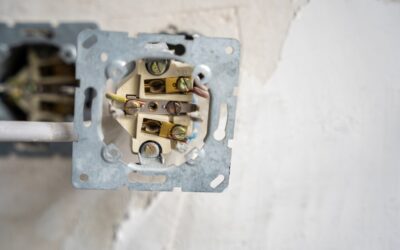
- Look for a bundle of white wires capped together at the back of the box. That bundle is your neutral.
- If you see only black wires (and a ground) on the switch, you likely have no accessible neutral and need a no-neutral option or an electrician to run one.
Do not assume; confirm. Installing a neutral-required switch without one leaves it dead, and forcing a workaround can damage the unit. If your box lacks a neutral, consider a Govee smart bulb or plug instead, or hire an electrician for the $150 to $300 rewire.
Installation Step by Step
Swapping a switch is a manageable 30-minute job for a confident DIYer, but respect the electricity. Gather a Phillips screwdriver, a voltage tester, wire strippers, and a few wire nuts.
- Kill the power at the breaker, not just the switch, and confirm with your tester.
- Photograph the existing wiring so you have a reference before disconnecting anything.
- Disconnect the old switch, noting the line (incoming hot), load (to the fixture), neutral, and ground.
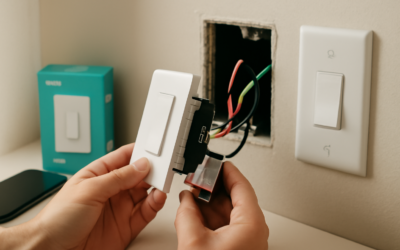
- Wire the Govee switch per its labels: line to line, load to load, the neutral bundle to the switch neutral lead, and ground to ground.
- Tuck the wires neatly into the box and screw the switch to the box; smart switches are deeper, so fold wires carefully.
- Restore power, then move to the app to finish setup.
If any step feels beyond your comfort, a licensed electrician handles a switch swap in under an hour for $80 to $150. There is no shame in that; a miswired switch is a fire risk.
Pairing and App Setup
Once powered, the switch broadcasts a setup signal. Open the Govee Home app, tap the plus icon, and select your switch model. The app walks you through connecting the switch to your 2.4GHz Wi-Fi network; note that, like most smart-home gear, Govee switches do not join 5GHz bands, so make sure your phone is on the 2.4GHz network during setup.
After it connects, name the switch by room so voice commands make sense, then link your Amazon Alexa or Google Home account under the app’s settings. From there you can build scenes and schedules. A favorite starter routine: lights ramp to 100 percent at 6 a.m. on weekdays and fade to 20 percent at 9 p.m., giving the house a gentle wind-down without touching a switch.
Key Features Worth Knowing
Govee’s smart switches carry a solid feature set for their price point:
- Voice control through Alexa and Google Assistant for hands-free operation.
- Scheduling and timers that run locally so lights still cycle if your Wi-Fi hiccups briefly.
- Scenes that group multiple Govee devices, so one command dims the switch and shifts your LED strips to a warm tone.
- Away mode that randomizes lighting to deter burglars while you travel.
- Manual override so the physical button always works, even if the internet is down.
Some models add dimming, which requires dimmable LED bulbs on the circuit to avoid flicker. Check the box; a standard on/off switch will not dim, and pairing a dimmer with non-dimmable bulbs causes buzzing and premature bulb failure.
How Govee Compares to Kasa and Lutron
Govee switches typically run $18 to $35 each, sitting in the value tier alongside TP-Link Kasa. Kasa has a longer track record for rock-solid Wi-Fi reliability, while Govee shines if you already own Govee strips and lamps, since everything lives in one app and shares scenes seamlessly.
Lutron Caseta occupies the premium lane at $50 to $70 per switch plus a required hub, but it delivers the most reliable dimming and, crucially, offers a no-neutral option that older homes need. If your box lacks a neutral and you want dimming, Lutron is worth the premium. For a modern home with neutrals and an existing Govee ecosystem, the Govee switch is the more sensible and affordable pick.
Is It Worth It?
For under $30 and half an hour of work, a Govee light switch delivers real convenience: scheduled lighting, voice control, and vacation security on fixtures that smart bulbs cannot handle. The two make-or-break factors are a neutral wire in the box and a 2.4GHz Wi-Fi network. Confirm both, and the upgrade is one of the easiest, highest-satisfaction smart-home projects you can knock out on a weekend. Skip it only if your wiring lacks a neutral and you are unwilling to rewire, in which case a smart bulb or plug gets you most of the way there.
Three-Way and Multi-Switch Situations
Many rooms are controlled by two or more switches, a hallway or staircase lit from both ends, for example, and these three-way and four-way circuits complicate a smart-switch install. A standard smart switch is designed for a single-pole circuit where one switch controls the light. If you drop a basic smart switch into a three-way circuit without accounting for the traveler wires, the automation logic gets confused and the physical switches fight each other.
Check whether the Govee model you are eyeing supports three-way wiring, and read the manual for how it handles the traveler and companion connections. Some smart-switch ecosystems solve this with an add-on companion switch that replaces the second switch and communicates with the main smart switch. Others rely on a single smart switch at the primary location with the secondary switch left in place but reconfigured. If your room has multiple switches and you are not confident reading the wiring, this is the scenario where an electrician earns their fee, since a miswired three-way circuit is both frustrating and a potential hazard.
Building Useful Automations
Once your switch is on the wall and paired, the real value comes from thoughtful routines rather than just toggling lights from your phone. Start with a few high-value automations that you will actually appreciate day to day:
- Sunset-triggered lighting so porch, entry, and living room lights fade on automatically as it gets dark, using your location’s sunset time.
- Wake and wind-down schedules that ramp lights up gently in the morning and dim them in the evening.
- Away/vacation mode that randomizes on and off times to make an empty house look occupied.
- Voice scenes like “movie time” that dim the switch and shift your Govee light strips to a warm accent color in one command.
- Motion-linked lighting that pairs the switch with a Govee sensor so a closet, laundry, or hallway light comes on when you enter.
Because Govee switches store schedules that run even if your Wi-Fi briefly drops, these routines keep working reliably. The more you lean into scenes and schedules, the more the switch justifies itself beyond the novelty of app control.
Troubleshooting Common Issues
If your switch will not connect during setup, the culprit is almost always the Wi-Fi band. Confirm your phone is on the 2.4GHz network, not the 5GHz one, since the switch only joins 2.4GHz. On combined-band routers that use one name for both, temporarily disabling the 5GHz band or creating a separate 2.4GHz guest network during pairing usually solves it. Keep the switch within reasonable range of the router during setup.
If the lights flicker after install on a dimming model, the bulbs are likely non-dimmable or incompatible; swap in quality dimmable LEDs rated for smart dimmers. If voice control stops responding, re-link the Govee skill in the Alexa or Google Home app, since account tokens occasionally need refreshing. And if the switch loses connection intermittently, a mesh Wi-Fi node closer to that part of the house restores a stable signal. With the neutral confirmed, the right bulbs installed, and the switch on a solid 2.4GHz network, a Govee light switch delivers dependable smart control that makes a genuinely noticeable difference in daily convenience and home security.