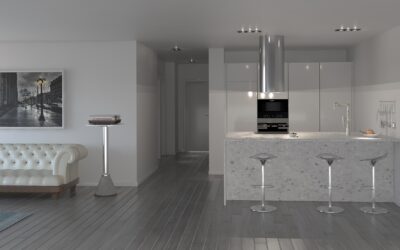
Picking flooring from a 3-inch sample square in a showroom is one of the worst ways to predict how a floor will look at full scale across your home. A quality flooring visualizer app solves this by overlaying real product textures into augmented-reality views of your actual rooms, photographed through your phone camera. The best apps from Mohawk, Shaw, Floor and Decor, and Pergo render with accurate scale, lighting adjustments, and seam patterns, helping you avoid the $8,000 mistake of installing flooring you hate after the first month. Knowing which app to use for which brand, plus how to set up your phone for accurate visualizations, makes flooring selection less of a gamble.
- How AR Flooring Visualizers Actually Work
- Mohawk Omnify Flooring Visualizer
- Shaw Try on Floor
- Floor and Decor Visualizer
- Roomvo Independent Visualizer
- Pergo and Other Manufacturer Apps
- Setting Up Your Phone for Best Results
- What Visualizers Cannot Show
- Beyond Single Rooms
- Putting Apps to Practical Use
How AR Flooring Visualizers Actually Work
Modern visualizer apps use ARKit on iPhone and ARCore on Android to detect floor planes through the camera. The app maps the floor space in real time, then applies a photorealistic texture of the selected flooring product. As you walk around the room with your phone, the floor appears to be installed with proper perspective, plank direction, and seam alignment.
Lighting analysis is the key differentiator between good and bad apps. Premium visualizers like Mohawk’s Omnify and Shaw’s Try on Floor adjust the texture brightness based on the room’s actual lighting conditions detected by the camera. Budget apps apply a single static texture that looks fake in shadowed corners or bright window-lit areas.
Mohawk Omnify Flooring Visualizer
Mohawk Omnify is the most comprehensive manufacturer visualizer on iOS and Android. The app contains the full Mohawk catalog including RevWood Plus laminate, SolidTech Plus rigid LVP, Karastan hardwood, and SmartStrand carpet. Beyond Mohawk products it also shows competitor textures for comparison. Free download, no signup required.
The app’s strongest feature is the side-by-side comparison mode, letting you view two flooring choices in the same room with a swipe gesture. Useful for choosing between gray oak laminate versus mid-tone walnut LVP without setting up two visualizations from scratch.
Shaw Try on Floor
Shaw’s Try on Floor app focuses on the brand’s Floorte Pro LVP, Epic Plus engineered hardwood, and Caress carpet lines. Available on iOS and Android, the app uses LIDAR on iPhone Pro models for more accurate room sensing. Without LIDAR, the app falls back to standard ARCore plane detection with slightly less accurate scale.
Shaw’s visualizer includes a unique feature called In Living Color that adjusts the texture based on time of day. Morning, midday, and evening light all render differently, helping you spot how a darker wood floor might look depressing in a north-facing room at 6 PM. Free with a free Shaw account.
Floor and Decor Visualizer
Floor and Decor’s Roomvo-powered visualizer runs on the web and through the mobile app. The strength is product breadth — Floor and Decor’s catalog includes thousands of tile, wood, and LVP SKUs from dozens of brands. The weakness is the web-first interface, which uses uploaded room photos rather than live AR.
- Upload a photo of your room from a standing height
- Mask the floor area with a paint-style tool
- Apply any product from the catalog and see the result
- Save and share renders with family or contractors
- Works on desktop, ideal for shopping at home before showroom visits
Roomvo Independent Visualizer
Roomvo powers the visualizer for hundreds of independent flooring retailers across the US. If your local retailer carries a Roomvo widget on their website, you can use it to render any product they sell. The technology behind it is solid and the rendering quality matches the major manufacturer apps.
The downside is fragmentation — you have to find the specific retailer’s Roomvo page rather than browsing one unified catalog. For homeowners working with a particular local store, this is the easiest path to visualization without downloading multiple apps.
Pergo and Other Manufacturer Apps
Pergo offers a basic visualizer on its website using uploaded room photos. The interface is less polished than Mohawk Omnify but covers the full Pergo Outlast Plus and Pergo Extreme lines. Bruce Hardwood has the AHF Products visualizer covering its hardwood collections. Armstrong, Mannington, and COREtec all have versions of similar tools with varying quality.
For homeowners committed to a single brand, the manufacturer-specific app delivers the most accurate product texture rendering. For cross-brand comparison shopping, third-party visualizers like Roomvo work better even with slightly less precise individual product textures.
Setting Up Your Phone for Best Results
Newer iPhones with LIDAR (iPhone 12 Pro and later Pro models) deliver dramatically better AR accuracy than older devices. The LIDAR scanner maps room geometry in three dimensions, giving the app a true sense of scale and depth. Without LIDAR, expect texture warping along walls and ceilings as you move around.
Take visualizations in good lighting — natural daylight from a window plus the room’s normal overhead lights. Move slowly when activating AR to give the app time to map the floor plane. Hold the phone at about 45 degrees toward the floor at chest height for the best plane detection. Avoid reflective floors during scanning; they confuse the depth sensor.
What Visualizers Cannot Show
Apps render textures convincingly but cannot replicate physical properties. The way light bounces off a high-gloss finish versus matte hardwood differs in person far more than on screen. Cool gray flooring looks blue in photos with high color temperature lighting but stays neutral under warm bulbs in real life.
Texture depth is another limitation. Embossed-in-register laminate that looks identical to a smoother LVP product in the app actually feels and reads very differently underfoot. Always request large physical samples — at least 12 by 12 inch — to confirm what the visualizer shows. Most flooring retailers send free samples through the mail.
Beyond Single Rooms
Premium visualizers now offer whole-home renderings. Upload your floor plan, and the app applies the selected product across all the spaces you specify. Useful for confirming visual continuity from foyer through kitchen, living room, and hallway without 5 separate AR sessions.
Some apps also include staging features that show the flooring with virtual furniture, allowing better evaluation of color matching against existing or planned furniture pieces. The Mohawk Omnify staging library is the largest among manufacturer apps.
Putting Apps to Practical Use
Use a flooring visualizer app as a first-pass elimination tool. Start with 8 to 12 product candidates from showroom or website browsing. Visualize each in your main living space and quickly eliminate anything that clearly does not match the room’s natural light, wall color, or furniture. Narrow to 3 finalists, order full-size physical samples, and make the final decision in person. This workflow saves trips to the showroom and prevents the buyer’s remorse that hits when the wrong-shade floor is already nailed down across 1,500 square feet.
Prefer to explore on your own?
See how new flooring looks in your actual room in seconds — free, no signup.
Try the free Floor Studio →