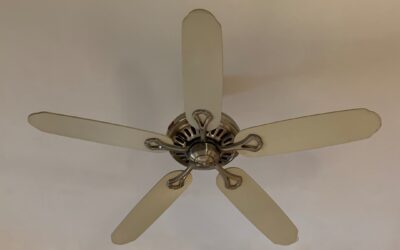
A Hunter fan is built to run for decades — the company has been making them since 1886 — which is exactly why replacing a worn part beats buying a whole new fan. When a pull chain snaps, a blade cracks, or the fan hums but will not spin, the right Hunter ceiling fan parts get it running again for a fraction of replacement cost. The trick is identifying your specific model and knowing which component actually failed. This guide walks through the most common parts, how to find yours, and how to fix the problems homeowners run into most.
First, Find Your Model Number
Nothing else matters until you know your model. Hunter parts are model-specific, and ordering the wrong blade or fitter wastes time and money. Look in these places:
- The motor housing: a label on top of the motor or inside the switch housing usually lists the model and type number.
- The mounting bracket or canopy: sometimes stamped near the ceiling mount.
- Original paperwork or the box: the manual lists the model and a parts diagram.
Write down the full model number and any type or series number. Hunter’s website and authorized parts dealers let you search by model to pull an exact parts list, which removes all the guesswork.
The Most Commonly Replaced Parts
Pull Chains and Pull-Chain Switches
The number-one failure. The little bead chain snaps, or the internal switch wears out so pulling it does nothing. A snapped chain where the switch still works just needs a new chain and connector. If the switch clicks but the fan does not respond, the switch itself failed — a $3 to $8 part. Match the switch by its number of speeds (usually 3-speed) and wire count.
Blades and Blade Arms (Irons)
Warped, cracked, or mismatched blades cause wobble and noise. Hunter blades come in specific sizes and mounting-hole patterns, so replacements must match your model. The blade arms — the metal brackets (Hunter calls them irons) connecting blades to the motor — can bend if the fan is bumped, and a bent iron is a classic wobble cause. Replace them as a matched set for balance.
Capacitors
If your fan hums but will not start, or only runs on some speeds, the capacitor is the prime suspect. This small component gives the motor its starting torque, and it degrades over years of heat. A replacement capacitor costs a few dollars, but you must match the microfarad (µF) rating and wire configuration printed on the old one exactly. This repair involves opening the switch housing and basic wiring, so cut power first and work carefully.
Remote Controls and Receivers
For remote-controlled Hunter fans, a dead remote or receiver leaves the fan unresponsive. Try new batteries and re-pairing first. If that fails, the receiver unit in the fan canopy may have failed — a common part to replace. Match the receiver to your fan’s remote system and confirm the frequency and dip-switch compatibility.
Light Kits and Glass
Broken glass shades, dead sockets, and failed light kits are all replaceable. Hunter glass is model-specific in size and fitter type (the neck that attaches it), so measure the fitter diameter. Integrated LED light modules are replaced as a unit when they fail.
Diagnosing Common Problems
Fan Wobbles
Wobble is almost always mechanical, not motor-related. Work through it in order:
- Tighten every blade screw and the screws holding the irons to the motor.
- Check that all blades are the same weight and not warped — use a blade-balancing kit to find the culprit.
- Confirm the downrod and mounting bracket are tight and the ball joint is seated.
A bent iron or a single warped blade throws off the balance; replacing the matched set usually cures it.
Fan Hums but Won’t Spin
This points to the capacitor or a seized bearing. First make sure nothing is physically blocking the blades, then suspect the capacitor — the most common cause. If the capacitor is fine and the motor still will not turn freely by hand, the motor bearings may have failed, which often means end-of-life for the fan.
Fan Runs on Only One Speed
A partial capacitor failure or a worn pull-chain switch typically causes lost speeds. Replace the switch first (cheaper and easier); if speeds are still missing, replace the capacitor.
Light Works, Fan Doesn’t (or Vice Versa)
On remote fans, this isolates the problem to one circuit in the receiver or a pull-chain switch. On pull-chain fans, it points to the specific switch for that function.
Where to Buy Genuine Hunter Parts
Start with Hunter’s official parts source or authorized dealers, searching by your model number for guaranteed fit. Many home centers and online fan-parts specialists stock common Hunter components like pull chains, capacitors, and glass. For discontinued models, specialist ceiling-fan parts suppliers often carry compatible replacements — but always verify the specs (blade size, capacitor rating, fitter diameter) against your original part. Generic universal parts sometimes work for chains and capacitors, but blades and glass should match the model.
When to Repair vs. Replace
Repairing makes sense for most single-part failures — a $5 pull chain or $8 capacitor brings a $200 fan back to life. Lean toward replacement when the motor bearings fail, when multiple parts have died at once, or when the fan is decades old and parts are scarce. Given how long Hunter motors last, though, the odds favor a simple, affordable fix.
The Bottom Line
Most Hunter fan problems trace to a handful of inexpensive, replaceable components — chains, switches, capacitors, blades, and receivers. Find your model number first, match the exact Hunter ceiling fan parts you need, cut the power before any wiring work, and you can keep a quality fan running smoothly for years instead of tossing it. A little troubleshooting saves you the cost and hassle of a full replacement.