A dead battery is the single most common reason a smart lock stops working, and it almost always happens at the worst moment, standing on the porch with grocery bags. Understanding your Kwikset smart lock battery is the easiest way to avoid getting locked out and to keep your lock’s touchpad, motor, and wireless features running reliably. This guide covers which batteries Kwikset locks use, how long they last, how to replace them, and how to fix the frustrating problems that crop up when power runs low.
- What Kind of Battery Kwikset Smart Locks Use
- How Long the Battery Lasts
- Reading the Low-Battery Warning
- How to Replace the Battery Step by Step
- What to Do If You Are Locked Out With a Dead Battery
- Troubleshooting Battery-Related Problems
- Maximizing Battery Life
- When to Keep Spares on Hand
- How Kwikset Locks Differ in Battery Behavior
- Storing and Disposing of Batteries Safely
- The Bottom Line on Power
What Kind of Battery Kwikset Smart Locks Use
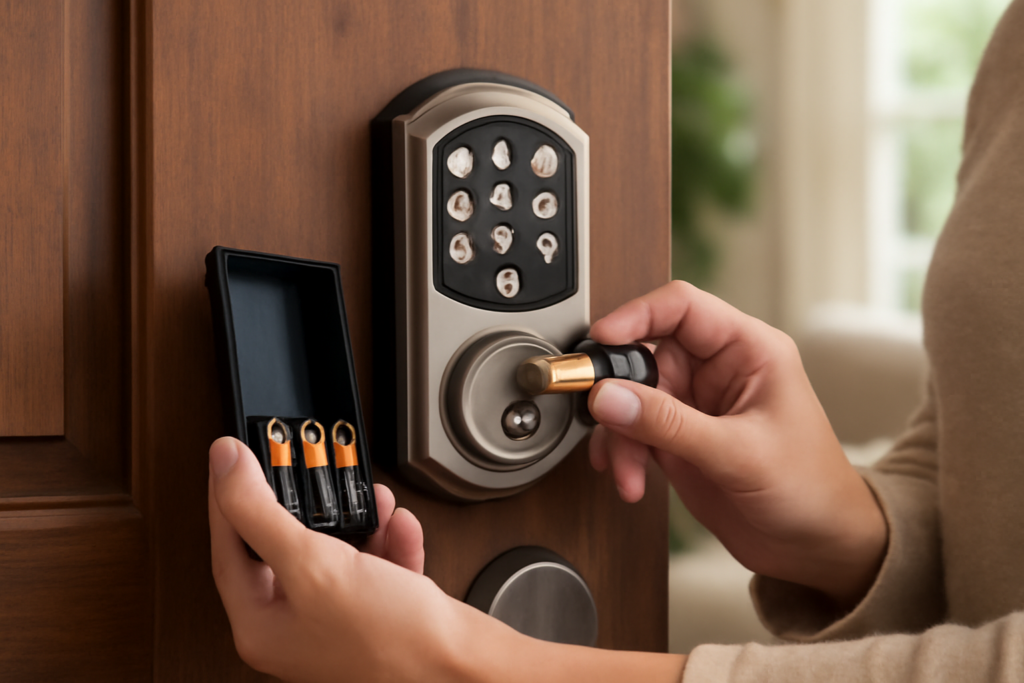
The vast majority of Kwikset smart locks, including the popular Halo, Halo Touch, SmartCode 888, SmartCode 916, SmartCode 260, and Kevo, run on standard AA alkaline batteries. Most models use four AA cells housed in a carrier inside the interior escutcheon. A handful of models use a different count, so always check your carrier, but four AAs is the norm.
- Type: Standard 1.5-volt AA alkaline is what Kwikset recommends.
- Avoid: Kwikset specifically advises against lithium AA batteries and rechargeables. Lithium cells deliver a higher voltage curve that can confuse the battery meter and, in some cases, damage electronics or cause erratic readings.
- Avoid: Do not mix old and new cells, or different brands, in the same carrier.
Good-quality name-brand alkalines such as Duracell or Energizer are the safe bet. A four-pack costs only a few dollars, so there is no reason to skimp.
How Long the Battery Lasts
Real-world battery life ranges from about six months to a year, and the biggest variable is how the lock communicates. A basic keypad-only lock with no wireless radio can go a year or more on a set of AAs. Add always-on Wi-Fi, and you might see three to six months, because keeping a Wi-Fi radio awake is power-hungry.
- Bluetooth or Z-Wave models: These sip power and often last 9 to 12 months.
- Wi-Fi models (Halo, Halo Touch): Expect roughly 3 to 6 months because the radio stays connected.
- High-traffic doors: Every lock and unlock spins the motor; a busy front door drains faster than a rarely used side door.
- Cold climates: Freezing temperatures reduce alkaline capacity, so exterior locks in northern winters may need more frequent changes.
Reading the Low-Battery Warning
Kwikset locks warn you well before they die, so you rarely need to be caught off guard. Watch for these signals:
- The keypad or status LED flashes red during operation.
- The motor sounds slow or labored when throwing the bolt.
- The companion app (Kwikset app or your smart-home platform) shows a battery percentage and pushes a low-battery notification.
When you see any of these, replace the batteries within a week. A lock will keep running on a red warning for a while, but once it stops it will not lock or unlock electronically until you swap cells.
How to Replace the Battery Step by Step
Changing the battery takes about two minutes and no tools on most models:
- Go to the interior side of the door where the thumb-turn is.
- Remove the battery cover. On many models it slides up and off, or is held by a single screw.
- Lift out the battery carrier or pack.
- Replace all four AA cells at once, matching the polarity markings.
- Reinsert the carrier and cover.
- Test the lock by entering your code or using the app.
Your codes, settings, and paired devices are stored in non-volatile memory, so you do not lose programming when you change batteries. There is no need to re-enroll fingerprints or re-add the lock to your app after a swap.
What to Do If You Are Locked Out With a Dead Battery
This is the scenario everyone fears, but Kwikset builds in backups. Nearly every Kwikset smart lock retains a physical key override. Keep a spare mechanical key somewhere accessible, such as a lockbox or with a trusted neighbor, and you can always get in. Some models, like the Halo Touch, also have external terminals or a 9-volt jump feature on certain product lines, but the physical key is the universal fallback. Never rely solely on electronic access for your only entry door.
Troubleshooting Battery-Related Problems
Not every glitch means the battery is dead. Here are the common issues and fixes:
- Lock reports low battery on fresh cells: You probably installed lithium or rechargeable AAs. Switch to standard alkaline and the meter should read correctly.
- Battery drains in weeks: A weak Wi-Fi signal makes the radio work harder retrying connections. Move your router closer or add a mesh point. Also check for a door that is misaligned, forcing the motor to strain against the strike.
- Lock unresponsive even after new batteries: Remove the carrier, wait 30 seconds to fully power-cycle, then reinsert. Confirm the cells are seated and polarity is correct.
- Corrosion in the carrier: Old leaking batteries can corrode contacts. Clean gently with a cotton swab and a little vinegar or contact cleaner, then dry thoroughly.
Maximizing Battery Life
A few habits stretch the time between changes:
- Fix door alignment. If the deadbolt scrapes or binds, the motor draws far more current. Adjust the strike plate so the bolt throws freely.
- Position your Wi-Fi router or a mesh node within solid range of the door to reduce radio retries.
- Turn off features you do not use, such as continuous status polling, in the app settings.
- Use fresh, name-brand alkalines rather than dollar-store cells that self-discharge faster.
When to Keep Spares on Hand
Because a four-pack of AA batteries is inexpensive, keep a set in a drawer near the door. Many homeowners set a reminder to swap batteries twice a year, timed with daylight saving changes the same way you would with smoke detectors. For Wi-Fi models that drain faster, quarterly checks make sense. Buying batteries in bulk brings the per-change cost to just a dollar or two.
How Kwikset Locks Differ in Battery Behavior
Not every Kwikset smart lock drains power the same way, and knowing your model’s radio type helps you predict battery life. The SmartCode 909 and 910 are keypad-only or basic models with no wireless radio, so they last the longest, often well over a year. The SmartCode 888 and 916 add Z-Wave or Zigbee for smart-home hubs, which are low-power protocols that still deliver strong life. The Halo and Halo Touch use built-in Wi-Fi with no hub required, which is the most convenient but also the most power-hungry configuration because the Wi-Fi radio maintains a constant cloud connection.
If long battery life is your top priority and you already run a smart-home hub like SmartThings or a Z-Wave controller, a hub-connected model will outlast a Wi-Fi model on the same batteries. If you want simplicity and no hub, accept that the Wi-Fi Halo trades some battery longevity for that convenience, and plan on more frequent changes.
Storing and Disposing of Batteries Safely
A few practical habits protect both your lock and your household. Store spare AA batteries in a cool, dry place, not a hot garage or a humid bathroom drawer, because heat accelerates self-discharge. Never leave dead alkaline batteries sitting in the lock; depleted cells can leak potassium hydroxide, which corrodes the metal contacts and can permanently damage the carrier. If you ever see white crust or greenish residue on the contacts, that is leakage, and you should clean it promptly with a cotton swab dipped in a little white vinegar, then dry thoroughly before installing fresh cells.
When you replace batteries, recycle the old ones responsibly. Many hardware stores and municipal facilities accept alkaline batteries for recycling, and it keeps them out of landfills. Because you change four cells at once a couple of times a year, keeping a small recycling bag in the utility drawer makes this effortless.
The Bottom Line on Power
Your Kwikset lock is only as reliable as the four AA cells inside it. Stick with quality alkaline batteries, never lithium or rechargeable, replace all four together, and respond promptly to the low-battery warning. Keep a mechanical key backup for emergencies, address any door alignment that strains the motor, and you will get consistent, worry-free operation. A smart lock that always works starts with a simple habit: watch the meter, and change the cells before they run out rather than after. With that routine in place, the convenience of keypad and app entry comes without the anxiety of a surprise lockout.