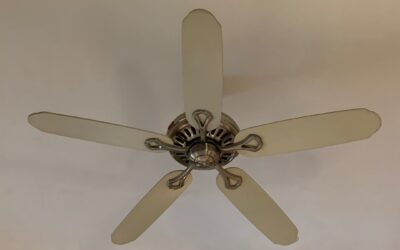
A ceiling fan that also serves as the room’s main light source solves two problems with one fixture, which is exactly why the category has grown so fast. A luminous ceiling fan pairs an efficient motor with an integrated LED light source, delivering both airflow and illumination from a single ceiling mount, and often folding in modern touches like dimming, color-temperature control, and remote operation. For rooms with only one ceiling box, it is the tidiest way to get comfortable air movement without sacrificing light.
This guide covers how to size a fan to your room, what to look for in the integrated lighting and motor, how controls work, and how to install and maintain one so it runs quietly for years.
What Makes a Fan “Luminous”
The defining feature is built-in lighting integrated into the fan body rather than a separate bulb kit bolted underneath. Many modern designs, including the Luminous brand and countless similar models, use a ring or panel of LEDs recessed into the motor housing, giving a flush, contemporary look with no exposed bulbs. The light and fan share the same power feed and often the same remote.
This integration brings advantages. LED panels are thin, so the fixture hugs the ceiling more closely than a traditional fan with a bulky glass light kit, an important gain in rooms with lower ceilings. The LEDs are also energy-efficient and long-lived, often rated for 25,000 hours or more, meaning you rarely think about the light source at all.
Sizing the Fan to Your Room
A fan that is too small barely stirs the air, while one too large overpowers a small room. Blade span, measured tip to tip, is the number to match to your square footage.
- Up to 75 sq ft (bathrooms, small offices): a 29 to 36 inch fan.
- 76 to 175 sq ft (bedrooms, kitchens): a 42 to 48 inch fan.
- 176 to 350 sq ft (living rooms, large bedrooms): a 52 to 56 inch fan.
- Over 350 sq ft (great rooms): a 60 inch or larger fan, or two fans.
Ceiling height matters too. Blades should hang 8 to 9 feet above the floor for best airflow and safety. On standard 8-foot ceilings, use a flush or “hugger” mount; on ceilings above 9 feet, add a downrod to bring the fan into the effective zone. A fan mounted too close to the ceiling moves noticeably less air.
Evaluating the Integrated Light
Since the light is built in, you cannot simply swap a brighter bulb, so judge the lighting carefully before buying. Check the total lumen output; a main-light fan for a bedroom should deliver at least 800 to 1,200 lumens, while a great room may want 1,500 or more. Underlit fans force you to add lamps, defeating the purpose.
Look for adjustable color temperature, a feature now common on quality models. A three-setting LED lets you pick warm 2700K for relaxing, neutral 4000K for everyday tasks, and cool 5000K for bright work light, all from the remote. Dimmability is equally valuable, but confirm the fan’s light dims from its own control, since many integrated LEDs are not compatible with standard wall dimmers and will flicker or buzz if you try.
Motor Types and Airflow
The motor determines how much air the fan moves, how quietly, and how much power it draws. Two motor types dominate. Traditional AC motors are inexpensive and reliable but offer fewer speeds and use more energy. DC motors cost more up front but run dramatically quieter, use up to 70 percent less electricity, offer more speed settings, and often include a reverse function on the remote.
Airflow itself is measured in CFM (cubic feet per minute). A good mid-size fan moves 4,000 to 6,000 CFM on high. Also check the efficiency rating, CFM per watt, if energy use matters to you. A DC-motor fan pushing 6,000 CFM while sipping 30 watts is far more efficient than an AC fan doing the same on 75 watts.
Controls and Smart Features
How you operate the fan shapes the daily experience. Basic models use a pull chain for speed and light, which is fine but dated. Most luminous fans ship with a handheld remote that controls fan speed, light on/off, dimming, and color temperature from the couch. Some replace the wall switch with a matching wall control so you are not hunting for a remote.
Smart models add Wi-Fi or Bluetooth, letting you control the fan through an app or voice assistant and even set schedules, such as spinning up before you get home. A useful physical feature to look for is a reverse setting: clockwise rotation in winter pushes warm air down from the ceiling, improving comfort and trimming heating costs.
Installing a Luminous Ceiling Fan
Installation is a moderate DIY project, but two safety points are non-negotiable. First, kill the power at the breaker, not just the switch. Second, the fan must hang from a fan-rated electrical box, a metal or reinforced box secured to the framing that can carry the weight and vibration of a moving fan. A standard light box is not safe for a fan and can let it fall.
- Turn off the breaker and remove the old fixture, confirming a fan-rated box is present or installing one.
- Mount the ceiling bracket, then hang the motor from its hook so your hands are free to wire.
- Connect the wires by color: black to black (fan), blue to the light wire, white to white (neutral), and ground to ground.
- Attach the blades and the integrated light housing, keeping every screw snug to prevent wobble and rattle.
- Restore power and test all speeds, the light, dimming, and the reverse function.
Balance the blades if the fan wobbles; most kits include a small clip-on weight you slide along a blade until the wobble stops. A balanced fan runs silently for years.
Choosing Blades and Style
Blades affect both airflow and appearance, so match them to your room and taste. Blade material ranges from MDF and plywood (painted, affordable, indoor-only) to solid wood (warm, premium) and ABS plastic or metal (best for damp and outdoor-rated fans). The number of blades matters less than people think; a well-designed three-blade fan can move as much air as a five-blade model while looking sleeker and running quieter.
Blade pitch, the angle of the blades, is the real airflow driver. A pitch of 12 to 15 degrees moves substantially more air than a flatter, purely decorative blade. For rooms exposed to moisture, choose a fan rated for the location. A “damp-rated” fan suits covered porches and bathrooms, while a “wet-rated” fan withstands direct rain on an open patio; never use an indoor fan outdoors, since humidity will corrode the motor and warp the blades. Finish and style should complement the room, from brushed nickel and matte black for modern spaces to bronze and wood tones for traditional ones.
Energy Savings and Efficiency
A ceiling fan does not lower the air temperature; it makes you feel cooler through the wind-chill effect, which lets you raise the thermostat and cut air-conditioning costs. Running a fan and setting the AC a few degrees higher can trim cooling bills noticeably, since a fan uses a fraction of the electricity of an air conditioner. The key is to turn fans off when you leave a room, because they cool people, not spaces.
DC-motor luminous fans amplify these savings, drawing as little as 5 to 30 watts versus 50 to 100 watts for an AC-motor fan, while the integrated LED light uses far less power than the incandescent bulbs old fans carried. In winter, flip the fan to clockwise on low to gently push warm air down from the ceiling, improving comfort and easing the heating load. Look for the ENERGY STAR label if efficiency is a priority, since certified fans meet strict airflow-per-watt standards for both the motor and the light.
Troubleshooting Common Issues
Most fan problems are simple to diagnose once you know the usual suspects. A wobbling fan is almost always unbalanced blades from dust buildup, a bent blade, or loose mounting screws; clean the blades, tighten everything, and use the included balancing kit before blaming the motor. A fan that hums but will not spin, or is stuck on one speed, usually has a failed capacitor, an inexpensive part you can replace.
- Wobble: clean and balance blades, tighten canopy and blade screws, confirm a fan-rated box.
- Won’t start or single speed only: suspect the capacitor or a remote-pairing issue.
- Light flickers or buzzes: the integrated LED is on an incompatible wall dimmer; use the fan’s own control instead.
- Remote unresponsive: replace the remote battery and re-pair, checking the receiver dip switches if present.
- Noisy motor: often a loose mounting or a fan running on a non-fan-rated speed control.
Working through these in order solves the vast majority of complaints without a service call, and many fixes cost only a few dollars in parts.
Maintenance for Quiet, Long Life
Fans need little care, but a little goes far. Dust the blades every few weeks, since caked dust unbalances them and makes them wobble and rattle. Tighten the blade and canopy screws once a year, because vibration slowly loosens them. If a wobble develops, re-balance the blades before assuming the motor is failing.
Should the integrated LED ever dim unevenly or fail, note that many brands sell the light module as a replaceable part, so you may not need a whole new fan. Chosen at the right size, with strong lumen output and a quiet DC motor, a luminous ceiling fan gives you comfortable air and clean, controllable light from one fixture, keeping your ceiling uncluttered and your energy bill lower than running a separate fan and light ever would.