A PoE security camera system sends both electrical power and video data over a single Ethernet cable, making it the gold standard for reliable, wired home surveillance. Unlike Wi-Fi cameras that can drop offline, a Power over Ethernet setup delivers steady 24/7 recording and higher resolution. This guide explains the components, wiring, and costs so you can plan a system with confidence.
- How Power over Ethernet Works
- Core Components You Need
- Choosing Camera Resolution
- NVR vs. DVR
- Planning Your Cable Runs
- Step-by-Step Installation
- Storage and Recording Time
- Remote Viewing and Alerts
- Security Best Practices
- Advantages Over Wi-Fi Cameras
- Budgeting for a Full System
- Camera Types and Where to Use Them
- Night Vision and Smart Detection
- PoE Switch vs. NVR PoE Ports
- Weatherproofing and Mounting Tips
- Field of View and Camera Count
- Integrating With Other Smart Devices
How Power over Ethernet Works
PoE technology injects DC power onto the same Cat5e or Cat6 cable that carries the video signal. That means each camera needs only one run of Ethernet cable back to the recorder or switch, with no separate power adapter at the camera location. The standard uses 48 volts and safely delivers power up to about 328 feet (100 meters), the maximum length for a single Ethernet run.
Core Components You Need
A complete PoE system has four main parts:
- PoE cameras: Weatherproof bullet or dome units, typically 4MP to 8MP (4K).
- An NVR (Network Video Recorder): Records and manages footage, usually with built-in PoE ports.
- A hard drive: Surveillance-grade drives like the WD Purple, sized 2TB to 8TB or more.
- Cat5e or Cat6 cable: One run per camera from the NVR or PoE switch.
Many kits bundle the NVR, four to eight cameras, a pre-installed drive, and cable spools for $300 to $700.
Choosing Camera Resolution
Resolution determines how much detail you capture. A 4MP camera (2560×1440) is a sensible baseline that reads license plates and faces at reasonable distances. 8MP 4K cameras deliver stunning clarity and let you digitally zoom into recorded footage, but they consume more storage and network bandwidth. For a driveway or entry where identification matters, spend on higher resolution; for a general yard overview, 4MP is plenty.
NVR vs. DVR
An NVR is the modern choice and pairs with digital IP cameras over Ethernet. Older DVR systems use analog coaxial cameras and BNC connectors. NVRs support higher resolution, single-cable PoE wiring, and easier remote viewing. Count the PoE ports before buying: an 8-channel NVR supports up to 8 cameras, while a 16-channel unit gives you room to expand.
Planning Your Cable Runs
Measure each cable path from the NVR to the camera location, adding slack for routing around framing. Keep every run under 328 feet. If you need a camera farther away, add a PoE switch or a PoE extender midway. Use outdoor-rated cable for exterior runs and consider running cable through the attic and down interior walls for a clean, tamper-resistant install.
Step-by-Step Installation
- Mount the NVR near your router and a power outlet, ideally in a closet or utility room.
- Mount each camera at 9 to 10 feet high, angled to cover entries and avoid direct sun glare.
- Run one Ethernet cable from each camera location back to the NVR’s PoE ports.
- Terminate cables with RJ45 connectors or use pre-made cables with molded ends.
- Plug cameras into the NVR PoE ports; they power on and appear automatically.
- Connect the NVR to your router, then configure recording and remote access.
A four-camera install takes a determined DIYer a weekend, mostly spent pulling cable.
Storage and Recording Time
How long footage lasts depends on resolution, frame rate, and drive size. As a rough guide, one 4MP camera recording continuously at 15 fps uses about 1TB per month. Using motion-triggered recording or the efficient H.265 codec can double or triple retention. A 4TB drive with four cameras on motion recording typically holds two to four weeks of footage before overwriting the oldest files.
Remote Viewing and Alerts
Reputable brands like Reolink, Amcrest, Hikvision, and Dahua offer mobile apps that let you watch live feeds and get motion alerts from anywhere. Setup usually involves scanning a QR code on the NVR. For better security, prefer manufacturers that support end-to-end encrypted P2P connections and avoid opening ports manually on your router, which can expose the system to the internet.
Security Best Practices
Because a PoE system connects to your network, harden it:
- Change the default admin password immediately to a strong, unique one.
- Keep NVR and camera firmware updated to patch vulnerabilities.
- Disable UPnP and manual port forwarding unless you fully understand the risk.
- Place cameras on a separate VLAN if your router supports it.
Advantages Over Wi-Fi Cameras
PoE cameras win on reliability. There is no wireless interference, no battery to recharge, and no bandwidth congestion competing with your streaming and gaming. The wired connection also resists jamming, a trick burglars use against wireless systems. The trade-off is the labor of running cable, but the payoff is a system that simply keeps recording.
Budgeting for a Full System
A capable four-camera 4MP PoE kit runs $300 to $500. Stepping up to eight 4K cameras with a larger drive pushes toward $700 to $1,200. If you hire a professional installer, add $100 to $200 per camera for labor. Buying a kit and installing it yourself keeps costs down while giving you enterprise-grade reliability.
Camera Types and Where to Use Them
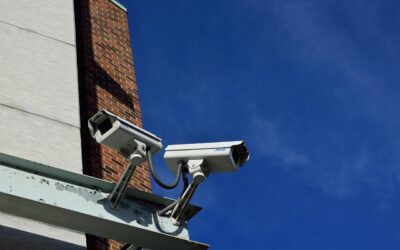
Different camera shapes suit different jobs. Bullet cameras are long and visible, making them a good deterrent for driveways and property lines, and their shape makes aiming obvious. Dome cameras are discreet and vandal-resistant, ideal for entries and porches. Turret (eyeball) cameras combine easy aiming with good night performance. For wide areas, consider a varifocal lens that lets you zoom to frame the exact scene, or a panoramic camera that covers a broad yard from one mounting point.
Night Vision and Smart Detection
Most PoE cameras include infrared night vision that reaches 60 to 100 feet in total darkness, rendering footage in black and white. Some models add color night vision using a built-in spotlight or a very sensitive sensor, which helps identify clothing and vehicle colors after dark. Newer NVRs offer smart detection that distinguishes people and vehicles from swaying branches or passing animals, cutting down false alerts dramatically. This person and vehicle filtering is one of the most useful upgrades for reducing notification fatigue.
PoE Switch vs. NVR PoE Ports
You can power cameras directly from an NVR’s built-in PoE ports or from a separate PoE network switch feeding cameras that report back to the NVR over the network. Using a dedicated PoE switch is helpful when cameras are spread across the property or when you want more cameras than the NVR has ports. It also lets you place a switch closer to a distant camera cluster, keeping each cable run within the 328-foot limit. Match the switch’s total power budget to the sum of your cameras’ wattage.
Weatherproofing and Mounting Tips
Outdoor cameras should carry at least an IP66 rating to withstand rain and dust. Mount them under an eave or use a weatherproof junction box to protect the cable connection from moisture, which is the most common failure point. Angle cameras slightly downward and avoid pointing them directly at the sun or bright lights, which causes glare and washout. Running the cable through a junction box also hides the connection and deters tampering.
Field of View and Camera Count
Plan camera placement around coverage rather than buying a random number of units. A typical fixed-lens camera covers a 90 to 110-degree horizontal field, so cover each approach to the house: front door, driveway, back patio, and any blind side. Four cameras handle a modest home, while eight to sixteen suit larger properties or those wanting overlapping coverage. Overlapping fields eliminate blind spots and ensure that if one camera is obscured, another still captures the scene.
Integrating With Other Smart Devices
Many PoE systems integrate with smart-home platforms, letting live feeds appear on a smart display or trigger routines. Some NVRs support ONVIF, an open standard that lets cameras and recorders from different brands work together, which protects your investment if you expand later. Look for ONVIF compatibility if you want flexibility to mix camera brands or connect to third-party software down the road, rather than being locked into a single manufacturer’s ecosystem.
In summary, a PoE security camera system offers the most dependable path to continuous, high-resolution home surveillance. By running a single Ethernet cable to each camera, sizing your NVR and hard drive to your needs, and following basic network security steps, you build a system that records around the clock for years with minimal fuss.