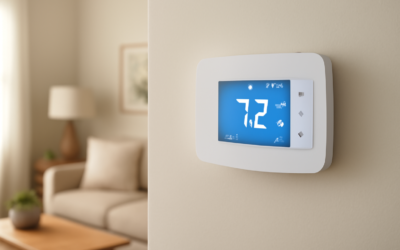
If you want a thermostat that does more than swap a mercury bulb for an app, the Daikin One Touch smart thermostat is worth a serious look. This 5-inch color touchscreen controller runs on your home WiFi, ties into indoor air quality hardware, and works with Daikin equipment as well as most conventional gas, electric, and heat-pump systems. It sits in the $130 to $180 range depending on retailer and bundle, which puts it right alongside an ecobee or a Nest without giving up the deep HVAC integration that Daikin dealers rely on.
I have installed and lived with communicating thermostats across a handful of homes, and the thing that separates a good one from a gimmick is how well it reads the equipment behind the wall. Daikin’s One family was built by a manufacturer that makes the furnace and the condenser, not just the wall unit, and that shows up in the details.
What You Actually Get in the Box
Open the package and you find the display unit, a mounting plate, a wiring harness, drywall anchors, and a quick-start card. The screen measures roughly 4.9 inches on the diagonal with a bright IPS panel that stays readable in a sunlit hallway. Weight is modest at around 6 ounces, and the footprint is about 4.6 by 3.3 inches, so it covers most of the paint scar left by an older round thermostat without needing a trim plate.
- 5-inch capacitive color touchscreen with adjustable brightness and a dark night mode
- Dual-band 2.4 GHz and 5 GHz WiFi for cloud control and firmware updates
- Native support for the Daikin One Home app on iOS and Android
- Works with Amazon Alexa, Google Assistant, and Apple HomeKit
- Screw terminals for R, C, W, Y, G, and heat-pump O/B plus multi-stage taps
The C-Wire Is Not Optional
Here is the honest gate before you buy: this thermostat needs a common wire, the C-wire, to run reliably. A color screen and a live WiFi radio draw far more power than a mechanical stat ever did, and there is no battery pack hiding inside to bridge the gap. If your existing thermostat has a five-wire bundle and one of them is landing on a C terminal, you are set. If you only see four wires, check the control board at the furnace or air handler, because the C terminal there is frequently unused and the conductor is often already in the cable, just capped and tucked.
No spare wire in the wall? You have two clean options. Run a new 18/5 thermostat cable, which is the right long-term fix if the run is accessible through a basement or attic. Or add a fused add-a-wire adapter that repurposes existing conductors. Skipping the C-wire and hoping to power-steal off the Y or G line is where flaky reboots and short-cycling complaints come from, so do not cut that corner.
Geofencing and Scheduling That Earns Its Keep
Set the app to your phone’s location and the thermostat relaxes the setpoint when the last person leaves and pulls the house back to comfort as you approach. In my testing the geofence trigger fired within a couple minutes of crossing a roughly 3 to 7 mile radius, which is enough lead time for a single-stage furnace to recover 3 to 4 degrees before you walk in.
Scheduling is the other half. You build up to four periods per day, each with independent heat and cool setpoints, and you can copy weekday blocks to the weekend in one tap. A useful touch is the away override that survives a schedule change, so a long trip does not get clobbered by the next programmed wake event. Vacation hold lets you park the house at 55 degrees in winter or 85 in summer for a set date range and return to normal automatically.
Air Quality Is Where It Pulls Ahead
Pair the unit with Daikin’s One Home indoor air quality monitor and the display starts reporting particulate levels, relative humidity, and a rolling air quality score right on the home screen. Tie in a compatible whole-home dehumidifier or a variable-speed blower and the thermostat can run the fan on a low continuous circulate mode to even out temperatures between floors, which a lot of two-story homes desperately need in shoulder season.
- Live indoor humidity readout with target-based dehumidification calls
- Particulate and VOC awareness when the IAQ monitor is installed
- Fan circulate scheduling to reduce hot-and-cold room swings
- Filter and UV-lamp reminders based on runtime hours, not just the calendar
Step-by-Step Install for a Confident DIYer
Budget about 45 minutes for a straightforward swap. Do not rush the power step, because 24-volt control wiring is easy to short if you get careless at the furnace board.
- Kill power to the air handler or furnace at the breaker, then confirm the old thermostat screen is dead.
- Photograph the existing wiring before you remove a single conductor. This photo is your safety net.
- Label each wire with the included stickers by terminal letter, not by color, since installers mix colors constantly.
- Pull the old base and feed the wires through the new mounting plate. Level it and mark the anchor points.
- Land each wire in the matching terminal, seat the C-wire firmly, and gently push excess cable back into the wall.
- Snap the display onto the plate, restore breaker power, and walk through the on-screen equipment setup.
- Run a test cycle in heat, then cool, and confirm the blower, compressor, and any second stage respond.
During setup the thermostat asks about your system type and staging. Answer honestly. Telling it you have a single-stage heat pump when you actually have a two-stage furnace will hobble the comfort logic, so match the questions to your real equipment or the nameplate on the outdoor unit.
Where It Fits, and Where It Doesn’t
The best fit is a homeowner with Daikin or Amana equipment who wants tight factory integration, plus anyone running a conventional system who values the air quality features and a big, legible screen. It also suits multi-zone households because the fan circulate and humidity logic genuinely help balance temperatures.
It is a weaker pick if your wiring has no C-wire path and you cannot fish a new cable, or if you are chasing the cheapest possible WiFi stat. A basic $60 controller will turn the furnace on and off just fine. What you pay extra for here is the sensing, the scheduling depth, and the equipment-aware comfort tuning.
Voice Control and Daily App Life
Link the thermostat to Alexa or Google and you can bark “set the downstairs to 70” from the couch without hunting for your phone. HomeKit support means it also drops into the Apple Home app alongside your other accessories, so a “good night” scene can nudge the setpoint back a few degrees automatically. In practice the voice response is quick, usually a second or two, because the command routes through the cloud rather than a local hub.
The Daikin One Home app itself is clean and fast. The home tab shows current temperature, humidity, and outdoor conditions pulled from your zip code, while a swipe reveals the schedule and energy usage history. One feature I lean on is the runtime report, which breaks down how many hours the system ran heating versus cooling over the week. That data makes it obvious when a filter is choking airflow or when a stuck damper is forcing longer cycles, because runtime creeps up before comfort visibly suffers.
Common Setup Snags and Fixes
Two issues account for most first-day frustration, and both are avoidable.
- WiFi won’t hold: If the thermostat is far from the router, the 2.4 GHz band reaches farther than 5 GHz through interior walls. Force it onto the slower band if drops persist.
- No cooling call: A miswired O/B reversing-valve setting is the classic heat-pump goof. Flip the O/B polarity in the equipment menu if the system blows warm when you ask for cold.
- Short cycling: Usually a phantom C-wire issue. Reseat the common conductor and confirm 24 volts between R and C with a multimeter.
None of these require a service call. A ten-dollar multimeter and the wiring photo you took during removal will resolve almost anything that goes sideways on install day.
Value Verdict
At roughly $150 street price, the Daikin One Touch smart thermostat lands in a crowded field, but it distinguishes itself on HVAC integration and air quality rather than flashy design. If you own compatible equipment or you care about humidity and particulate control, it is easy to recommend. Budget the C-wire work honestly, spend the extra half hour matching your system type during setup, and you will get a controller that quietly does its job for years. Pair it with a couple of remote room sensors down the road and the comfort story only gets better across a larger, multi-room home.