Roughly 35 percent of US workers do at least part of their job from home, yet most still work from a dining table or a corner of the bedroom. Building a real DIY home office changes the equation by giving you a dedicated, productive workspace without the cost of a professional renovation. With careful planning, you can convert a spare bedroom, closet, or corner into a comfortable office for 400 to 2,500 dollars depending on existing furniture and fixtures. The keys are layout, lighting, ergonomics, and storage that actually fits the way you work.
- Pick the Right Space
- Plan the Layout Before Buying Anything
- Choose a Desk That Fits the Work
- Get the Chair Right
- Lighting That Prevents Eye Strain
- Tame the Audio Environment
- Cable and Power Management
- Storage and Organization
- Personal Touches Without Distraction
- Home Office Design Ideas That Start From the Floor Up
- Final Setup Tips
Pick the Right Space
Not every room is a candidate. A good home office space needs:
- Reliable Wi-Fi (at least 100 Mbps download for video calls)
- At least one 120V electrical outlet, ideally two
- Natural light, ideally with a window that opens
- Door that closes for privacy and acoustic separation
- Minimum 50 square feet for a single desk setup
- Stable temperature year-round (drafty enclosed porches struggle)
Spare bedrooms are the easiest conversion. Walk-in closets can become bonus offices (cloffices) for under 600 dollars. Basement rooms work if waterproofing and lighting are sorted. Avoid garages without HVAC; productivity drops fast when the room is 50°F or 90°F.
Plan the Layout Before Buying Anything
Sketch the room with measurements before any purchases. Position the desk so you face into the room or out a window, never with your back to the door (most people find it unsettling on video calls and during deep work). Allow a minimum 36 inches between desk and wall behind for chair clearance.
The classic three-zone layout works: a primary work zone with desk and main monitor, a secondary zone for printing/scanning or a second screen, and a comfort zone with a small reading chair or floor plant. Even in a 7-by-10-foot bedroom, all three zones fit comfortably.
Choose a Desk That Fits the Work
Desk choice matters more than any other piece of furniture. Match it to what you actually do:
- Standard desk (29 inches tall): Fine for laptop-only work; check that monitor height meets eye level when added
- Standing desk: Sit-stand adjustable from 24 to 50 inches; Uplift V2 (700 dollars) or budget Flexispot E7 (350 dollars)
- L-shaped corner desk: Best for dual-monitor setups with documents on the side
- Wall-mounted floating desk: Frees floor space in small rooms; load capacity matters (200 lb minimum)
- DIY plywood and sawhorse desk: 80 to 150 dollars in materials; surprisingly stable for laptop work
The IKEA Karlby countertop on Alex drawer units is the DIY classic, totaling around 250 dollars for a wide solid-feeling work surface that holds two monitors.
Get the Chair Right
A good chair is the single biggest productivity investment. Plan to spend 250 dollars minimum on a chair you sit in 6 plus hours daily. The Herman Miller Aeron (1,400 dollars new, 600 dollars used) is the gold standard. The Steelcase Series 1 (450 dollars) offers 80 percent of the function. For tight budgets, the Branch Ergonomic Chair (350 dollars) and the IKEA Markus (250 dollars) score well in long-term reviews.
Skip gaming chairs unless they have proper lumbar adjustment. Most are styled for marketing photos, not 8-hour workdays.
Lighting That Prevents Eye Strain
Most home offices are under-lit by half. Aim for 500 to 750 lux on the desk surface; a basic phone light meter app will measure it. Layer three light sources:
- Natural light from a window placed to the side of the desk, not behind or in front
- Overhead ambient light at 3000K to 4000K color temperature; 800 to 1,500 lumens for a small room
- Task lighting on the desk; the BenQ ScreenBar (110 dollars) clips to a monitor and eliminates glare
For video calls, add a soft front light at face level. A simple LED ring light (30 dollars) or a daylight LED panel (60 dollars) on a small tripod fixes the underlit washed-out look that ruins client calls.
Tame the Audio Environment
Echo and outside noise wreck calls and concentration. Cheap fixes:
- Heavy curtains across windows (cuts outside noise and dampens room echo)
- Acoustic foam panels (40 to 100 dollars for 12 panels) on the wall behind you
- A bookshelf along one wall (books are excellent sound diffusers)
- A thick area rug (cuts hard-floor reverb by 30 to 50 percent)
- A good USB microphone (Blue Yeti or Shure MV7) for calls
If neighbors are an issue, a door sweep and weatherstripping on the door frame (20 dollars) blocks 40 to 60 percent of voice transmission for almost no money.
Cable and Power Management
A pile of cables shortens the life of every piece of equipment. Plan power early:
- One surge protector per workstation, ideally with USB ports
- Cable raceways on the wall to hide vertical runs (10 dollars per 8 ft)
- Under-desk cable trays (J-channel style; 20 to 40 dollars)
- Velcro cable ties instead of zip ties for adjustability
- A dedicated 20-amp circuit if running multiple monitors plus a workstation; usually 200 to 400 dollars for an electrician
If WiFi is weak in the chosen room, a mesh node placed 6 to 10 feet away or a powerline ethernet adapter (60 dollars) restores reliable speeds.
Storage and Organization
Vertical storage frees floor space in small offices. Floating shelves (40 to 80 dollars each), a pegboard wall organizer (50 dollars), and a small filing cabinet on casters (120 dollars) hold most home office paper without consuming square footage. For supplies, drawer organizers turn a single deep drawer into seven sections for pens, sticky notes, and chargers.
Plan a single inbox tray. Anything that crosses your desk during the day either gets done, filed, or trashed within 48 hours. The tray prevents creeping piles that visually exhaust you over time.
Personal Touches Without Distraction
A productive office still needs to feel like yours. Add one large piece of art opposite the desk, two or three small plants (snake plant, pothos, and ZZ plant tolerate low light), and a single photo or memento. Skip cluttered desk decor; every object in your peripheral vision splits attention by a measurable amount.
Wall color matters too. Soft greens (Benjamin Moore Saybrook Sage HC-114) and warm grays (Sherwin-Williams Repose Gray SW 7015) test well for focus. Avoid bright reds and oranges, which raise heart rate and reduce ability to concentrate on detail work.
Home Office Design Ideas That Start From the Floor Up
Layout, lighting, and furniture make an office work. Finishes make it feel like a place you want to spend eight hours. These home office design ideas focus on the surfaces and built-in elements that give a converted room real character, starting with the part most people overlook: the floor.
Choose Flooring That Handles a Rolling Chair
An office chair rolls back and forth thousands of times a week, and that concentrated wear shows up fast. Luxury vinyl plank and laminate are the most forgiving choices for a DIY office, with wear layers that resist caster scratches and costs typically in the $2 to $5 per square foot range for materials. Hardwood looks warm and upscale but needs a chair mat or soft rubber casters to avoid a worn arc behind the desk. Low-pile carpet or carpet tile dampens sound well, which helps on video calls, but standard casters sink in and drag, so plan on a firm chair mat. Whatever you choose, put the area rug in the conversation zone or reading corner rather than under the rolling chair, where it will bunch and trip you.
Build a Statement Wall
The wall behind you is what colleagues see on every call, so treat it as the room’s focal point. Popular options include:
- Wood slat or fluted panels, which look custom and add some acoustic absorption.
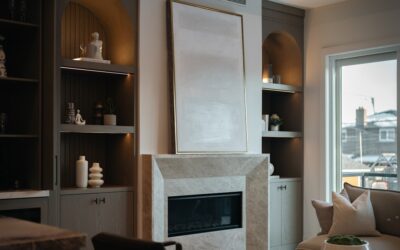
- Floor-to-ceiling bookshelves built from stock cabinets or shelving units, trimmed out to look built-in.
- Board-and-batten or picture-frame molding painted a deep tone for a classic study feel.
- Peel-and-stick wallpaper in a subtle pattern, easy to remove later in a rental.
Match the Style to the Space
Small rooms and closet offices benefit from a light, Scandinavian palette: pale wood, white walls, and minimal hardware so the space feels bigger. Larger rooms can handle a dark, moody scheme with charcoal or deep green walls, warm wood, and brass lamps, which reads as a library rather than a workspace. For a shared office, a long built-in desk run along one wall with two workstations and a shared drawer bank in the middle saves space compared with two freestanding desks. In guest-room offices, a wall bed or fold-down desk lets the room switch roles in minutes.
Plan Built-Ins and Lighting Together
Built-in desks and shelving look best when lighting is integrated, such as LED strips under upper shelves or picture lights above a bookcase. Plug-in and low-voltage strip lights are easy DIY projects, but adding hardwired fixtures, new switches, or a dedicated circuit should be handled by a licensed electrician. Settle these design details before painting and flooring so you only disturb finished surfaces once.
Final Setup Tips
Test the space for a full work week before committing to permanent installations. Pay attention to chair height, monitor angle, and where the afternoon sun lands across your screen. Most DIY home office projects need one or two adjustments after real use exposes problems.
A well-planned DIY home office pays itself back in months, not years, through better focus, fewer headaches, and more usable hours per day. Budget 800 to 1,500 dollars for the average conversion, and prioritize chair, lighting, and audio above almost everything else.