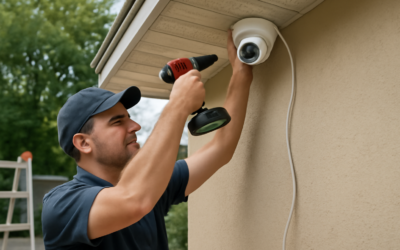
A dome security camera is the discreet, vandal-resistant workhorse of the surveillance world, named for the rounded dome housing that protects and conceals its lens. You see them mounted on ceilings in stores, offices, and increasingly on residential porches and garages. Their subtle profile, wide coverage, and tough housing make them a favorite for both deterrence and reliable everyday monitoring. This guide explains how dome cameras work, where they shine, what features matter, and how to place and install one correctly.
- What Sets Dome Cameras Apart
- Dome vs Bullet Cameras
- Key Features to Look For
- Indoor vs Outdoor Dome Cameras
- Wired vs Wireless Options
- Where to Place Dome Cameras
- Cost of Dome Security Cameras
- Installation Tips
- Common Mistakes to Avoid
- Storage and Recording Options
- Understanding Field of View and Focal Length
- Powering and Networking Your Cameras
- Is a Dome Camera Right for You?
What Sets Dome Cameras Apart
The defining feature is the tinted dome that covers the lens. This housing does three important things. First, it hides which direction the camera is aimed, so a would-be intruder cannot tell exactly what is being recorded. Second, it protects the lens from dust, weather, and tampering. Third, the low-profile shape blends into ceilings and eaves far better than a protruding bullet camera. That combination of discretion and durability is why dome cameras dominate indoor commercial installs and are growing fast in home use.
Dome vs Bullet Cameras
The two most common camera shapes suit different jobs:
- Dome cameras are discreet, harder to vandalize, and offer a wide, sometimes 360-degree field depending on the model. They are ideal for ceilings and areas where you do not want an obvious camera.
- Bullet cameras are cylindrical and visible, which makes them stronger visual deterrents and easier to aim at a specific distant point. They typically have longer-range night vision.
Many homeowners use bullet cameras as obvious deterrents at the driveway and dome cameras for discreet coverage of porches, patios, and interiors. The two complement each other well.
Key Features to Look For
When comparing dome cameras, focus on the specs that actually affect performance:
- Resolution: 1080p is the minimum; 4MP is a strong sweet spot; 4K delivers the sharpest detail for identifying faces.
- Field of view: A wider angle (100 to 180 degrees) covers more area, while some domes offer full panoramic views.
- Night vision: Infrared LEDs provide black-and-white night footage; look for a stated range, often 30 to 100 feet.
- Weather rating: For outdoor use, choose an IP66 or IP67-rated housing that resists rain and dust.
- Vandal resistance: An IK10 rating means the dome can survive impacts, important for reachable outdoor mounts.
- Smart detection: Person and vehicle detection cuts false alerts from swaying branches and passing headlights.
Indoor vs Outdoor Dome Cameras
Not every dome camera is built for the elements. Indoor models are cheaper and lack the weatherproof housing outdoor use demands. Outdoor dome cameras carry an IP66 or higher rating, tolerate temperature swings, and often add a vandal-resistant IK10 metal housing. If you are mounting under an eave or on a porch ceiling, confirm the camera is rated for outdoor conditions, and give it some overhang protection from direct rain even so, which also reduces glare and water spots on the dome.
Wired vs Wireless Options
Dome cameras come in several connectivity types:
- PoE (Power over Ethernet) domes use a single Ethernet cable for both power and data, delivering the most reliable connection and continuous power. Best for permanent installations.
- Wi-Fi domes are easier to install but depend on signal strength and still usually need a power wire.
- Analog/coax domes connect to older DVR systems and are the budget path for existing setups.
For a new home or small business system, PoE dome cameras offer the best balance of reliability, image quality, and easy single-cable runs.
Where to Place Dome Cameras
Placement determines how useful the footage is. Effective spots include:
- Ceilings over entryways and hallways for wide, top-down coverage.
- Porch and patio ceilings, mounted about 9 to 10 feet up, high enough to avoid tampering but low enough to capture faces.
- Garage and driveway eaves for vehicle and package monitoring.
- Over cash registers or key rooms in a business.
Avoid aiming directly at bright light sources or windows, which wash out the image, and mind the dome’s tendency to reflect nearby infrared light at night, which can cause glare inside the housing.
Cost of Dome Security Cameras
Prices span a wide range based on resolution and build quality:
- Basic 1080p indoor domes: $30 to $80 each.
- Quality 4MP outdoor PoE domes: $80 to $200 each.
- 4K vandal-resistant commercial domes: $150 to $400-plus each.
- A full home system with four to eight dome cameras and an NVR: $400 to $2,000.
Professional installation adds roughly $100 to $200 per camera if you need cabling run through walls and ceilings.
Installation Tips
- Choose a mounting spot with solid backing for the screws and a clear, unobstructed view.
- Run the cable before final mounting, using PoE where possible for one-cable simplicity.
- Mount high enough to deter tampering but angled to capture identifiable faces, not just the tops of heads.
- Peel the protective film off the dome and keep the housing clean; smudges and dust blur the image.
- Configure motion zones and smart detection to reduce false alerts.
Common Mistakes to Avoid
- Mounting too high, capturing only the tops of heads and no usable faces.
- Using an indoor camera outdoors, where moisture quickly kills it.
- Ignoring infrared glare, letting the dome reflect its own night-vision light.
- Pointing into bright light, washing out the whole frame.
- Never changing default passwords, leaving the camera open to hijacking.
Storage and Recording Options
A camera is only as useful as the footage it saves, so plan your storage. Many dome cameras support a microSD card slot for local, on-camera recording, which is simple and cheap but limited in capacity and vulnerable if the camera is stolen. An NVR (network video recorder) gives you centralized, higher-capacity storage for multiple cameras and continuous recording, ideal for a permanent home or business system. Cloud storage keeps clips safe off-site even if the camera is damaged, but usually carries a monthly subscription per camera. Many homeowners use a hybrid approach, recording locally to an NVR while backing up key motion clips to the cloud. Decide how many days of retention you need and size your storage accordingly before you buy.
Understanding Field of View and Focal Length
How much area a dome camera covers depends on its lens focal length and sensor. A wide-angle lens (around 2.8mm) captures a broad 100- to 110-degree view, perfect for taking in an entire room or patio, though distant faces appear small. A longer focal length (6mm or more) narrows the view but magnifies detail, better for watching a specific distant point like a gate. Some dome cameras offer a motorized varifocal lens you can zoom to dial in the exact coverage, and multi-sensor domes stitch several lenses into a panoramic view. Match the lens to the job: wide for general area coverage, narrow for identifying detail at distance. Getting this right avoids the frustration of footage that is either too cramped or too distant to be useful.
Powering and Networking Your Cameras
Reliable power and network connections keep a camera system running. PoE dome cameras draw power over the same Ethernet cable that carries their data, so a single run to a PoE switch or NVR handles everything, which is why professionals favor them. Plan your cable routes before mounting, keeping runs under the roughly 300-foot Ethernet limit and away from sources of electrical interference. For Wi-Fi models, test signal strength at the mounting location before committing, since a weak connection causes dropped footage. Whatever the connection type, put your cameras and recorder on a secure network segment, change every default password, and keep the firmware updated, because an unpatched camera is a genuine entry point for intruders into your home network.
Is a Dome Camera Right for You?
If you want discreet, durable, tamper-resistant coverage that blends into your ceilings and eaves, a dome security camera is an excellent choice for both homes and businesses. Pick the right resolution for the distance you need to identify people, choose a weatherproof and vandal-resistant model for outdoor spots, and favor PoE for reliability. Place cameras thoughtfully to capture faces rather than scalps, keep the dome clean, and secure the camera with a strong password. Do that, and a dome camera quietly delivers years of dependable, hard-to-defeat surveillance.
Balance discretion with a clear line of sight, match the specs to your coverage distance, and mind glare and weather. Those details are what turn a dome camera from a decorative bump on the ceiling into footage you can actually rely on when it counts.