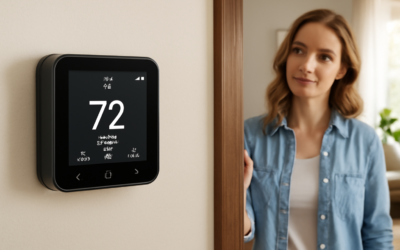
The Honeywell Home Wi-Fi smart color thermostat (model RTH9585WF1004) blends a bright color touchscreen with app-based control and flexible scheduling. It sits in the mid-range of smart thermostats, typically $150 to $200, and appeals to homeowners who want a customizable display without a subscription. This guide covers its features, installation, and whether it fits your system.
- Key Features at a Glance
- System Compatibility
- Why the C-Wire Matters
- Step-by-Step Installation
- Setting Up the App and Wi-Fi
- Scheduling and Smart Response
- Voice Control Integration
- Energy Savings Potential
- Honeywell RTH9585 vs. the Competition
- Common Setup Problems
- Maintenance and Longevity
- Understanding the Terminal Labels
- Adjusting Comfort and Recovery Settings
- Using It With Multiple HVAC Zones
- Firmware Updates and App Reliability
- Humidity Display and Its Uses
- Comparing Setback Strategies
Key Features at a Glance
The standout feature is the customizable color touchscreen. You can match the background to your wall paint or choose from a palette, and the large digits are readable across a room. Beyond looks, it delivers 7-day flexible programming, smartphone control through the Honeywell Home app, and voice compatibility with Amazon Alexa and Google Assistant. It also shows indoor humidity and gives local weather on the display.
System Compatibility
Before buying, confirm your HVAC system matches. This thermostat works with:
- Forced-air gas, oil, and electric furnaces
- Central air conditioning
- Heat pumps with auxiliary and emergency heat
- Up to 3 heat and 2 cool stages in multistage systems
It requires a common wire (C-wire) for reliable power. If your existing thermostat has only two wires, you will likely need to run a C-wire or use an add-a-wire adapter. Line-voltage systems like electric baseboard heaters (120V or 240V) are not compatible.
Why the C-Wire Matters
The C-wire, or common wire, delivers continuous 24-volt power so the Wi-Fi radio and bright screen stay on without draining the system. Older homes often lack one at the thermostat. If you cannot find a C-wire terminal, options include repurposing an unused wire in the bundle, installing a Honeywell C-wire adapter at the furnace, or hiring an HVAC tech for about $100 to $150. Skipping proper power can cause the thermostat to reboot or lose Wi-Fi.
Step-by-Step Installation
- Turn off power to your HVAC system at the breaker to avoid shorting the control board.
- Remove the old thermostat faceplate and photograph the wiring for reference.
- Label each wire with the included stickers matching the terminal letters (R, C, W, Y, G, and so on).
- Mount the new base plate, feeding wires through the center, and level it before drilling.
- Connect each labeled wire to the matching terminal, pressing the tabs firmly.
- Snap on the display, restore power, and follow the on-screen setup wizard.
Most confident DIYers finish in 30 to 45 minutes. If you see unfamiliar wire colors or a heat-pump setup, consider professional help.
Setting Up the App and Wi-Fi
During setup the thermostat asks you to join your 2.4 GHz Wi-Fi network, then prompts you to create a Honeywell Home account. Once linked, the app lets you adjust temperature from anywhere, receive filter-change reminders, and get alerts if indoor temperatures reach extremes, which is useful for catching a failed furnace before pipes freeze.
Scheduling and Smart Response
The 7-day schedule lets you set four periods per day: wake, away, home, and sleep. A typical energy-saving setup keeps the house at 68°F while occupied in winter and drops to 62°F overnight and when away. The optional Smart Response feature learns how long your system takes to reach a target and starts early so the house hits your desired temperature exactly at the scheduled time rather than beginning to heat then.
Voice Control Integration
Linking the thermostat to Alexa or Google Assistant lets you say “set the thermostat to 70 degrees” or “what’s the temperature inside.” Setup happens through the assistant’s app by enabling the Honeywell Home skill and signing in. Unlike some competitors, this model does not include a built-in geofencing feature that adjusts based on your phone’s location, so scheduling and voice remain the primary controls.
Energy Savings Potential
Honeywell and the EPA note that a well-programmed thermostat can trim heating and cooling costs by roughly 10 percent a year, which for an average home is $130 to $180. The savings come from setbacks while you sleep or are away rather than from any magic algorithm. Setting an 8-degree setback for eight hours a day yields the bulk of the benefit.
Honeywell RTH9585 vs. the Competition
Compared with the Google Nest and ecobee, the Honeywell color thermostat trades automatic learning and remote sensors for a simpler, customizable display and no ongoing account fees. It lacks the room sensors that let ecobee balance temperatures across a house. However, it costs less than a Nest Learning Thermostat and gives you precise manual control, which many users prefer over algorithms that second-guess their habits.
Common Setup Problems
The most frequent complaint is intermittent Wi-Fi, almost always traced to insufficient C-wire power. Ensure the C-wire is landed properly. A blank screen after installation usually means a tripped safety switch or a wire in the wrong terminal, so recheck against your photo. If the screen shows “waiting for equipment,” give the compressor its built-in five-minute delay before assuming a fault.
Maintenance and Longevity
These thermostats are low maintenance. Dust the screen occasionally, respond to the filter-change reminders, and keep the app updated. Expect a service life of ten years or more. Because settings live in your Honeywell Home account, replacing the unit later restores your schedule quickly.
Understanding the Terminal Labels
Wiring confidence comes from knowing what each terminal does. The common ones you will encounter are R or Rh (power for heating), Rc (power for cooling), W (heat call), Y (cooling compressor), G (fan), and C (common). Heat pumps add O/B (the reversing valve) and aux/E terminals for auxiliary and emergency heat. If your old thermostat had jumpers between R terminals, note that before removing it. Matching each labeled wire to the correct terminal is the single most important step, which is why photographing and labeling the old wiring pays off.
Adjusting Comfort and Recovery Settings
Beyond the basic schedule, this thermostat lets you fine-tune how aggressively it manages comfort. You can set a temperature swing (cycle rate) that determines how far the room drifts before the system kicks on, trading a touch of efficiency for tighter comfort. The Smart Response recovery can be toggled off if you prefer the system to start heating exactly at the scheduled time rather than early. Adjusting these settings lets you balance precise comfort against energy savings to match your household’s preferences.
Using It With Multiple HVAC Zones
Homes with separate upstairs and downstairs zones need one thermostat per zone, each wired to its own zone control board. The Honeywell color thermostat works well in zoned setups, and the app displays each thermostat separately so you can manage them from one screen. This is convenient for setting the bedroom zone cooler at night while keeping the main floor warmer, a common comfort strategy in two-story homes that a single-zone system cannot achieve.
Firmware Updates and App Reliability
Like any connected device, the thermostat receives periodic firmware updates that improve stability and add features. These usually install automatically overnight. Keeping the Honeywell Home app updated on your phone ensures remote control keeps working smoothly after your phone’s operating system updates. If remote access ever stops responding, a quick power cycle of the thermostat and a router restart resolve the vast majority of connectivity hiccups without any service call.
Humidity Display and Its Uses
The onboard humidity reading is more than a curiosity. Watching indoor humidity helps you decide when to run a humidifier in dry winter months or a dehumidifier in muggy summers, keeping levels in the healthy 30 to 50 percent range. Excess humidity fosters mold and dust mites, while overly dry air irritates skin and airways. Although this model does not actively control a whole-home humidifier on its own, the visible reading gives you the data to act, which many basic thermostats omit entirely.
Comparing Setback Strategies
How you program setbacks determines your savings. A deep setback of 8 to 10 degrees during the eight hours you sleep and the hours the house is empty captures most of the benefit without sacrificing comfort when you are home. Avoid the myth that holding a constant temperature saves energy; letting the house drift during unoccupied periods always uses less. With four editable periods per day across seven days, this thermostat gives enough granularity to tailor a schedule around a real weekly routine.
Overall, the Honeywell Home Wi-Fi smart color thermostat is a strong pick for homeowners who want a vivid, customizable display, dependable scheduling, and voice control without subscriptions or learning algorithms. Verify you have a C-wire, confirm your HVAC type, and set thoughtful setbacks, and this thermostat will pay for itself through comfort and modest energy savings within a couple of seasons.