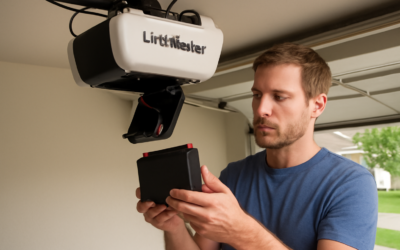
A beeping garage door opener or a remote that only works from three feet away almost always means one thing — a dead battery — and it’s a fix that takes minutes and a few dollars, not a service call. LiftMaster garage door opener battery replacement covers three separate batteries that homeowners mix up: the backup battery inside the motor unit, the small battery in the handheld remote, and the battery in the wireless keypad. Each is easy to swap once you know which one is failing and what it takes, and this guide walks through all three so you can silence that chirp and restore full range without guessing. Let’s sort out which battery you actually need.
Part of our Garage Doors guide — explore the full guide →
- Three Different Batteries, Three Different Symptoms
- The Backup Battery Explained
- Which Backup Battery You Need
- Replacing the Backup Battery Step by Step
- Replacing the Remote Battery
- Replacing the Keypad Battery
- How Long Each Battery Lasts
- Troubleshooting After a Battery Swap
- Extending Battery Life
- A Few Final Tips
Three Different Batteries, Three Different Symptoms
Before buying anything, identify which battery is dying by its symptom. The three batteries do completely different jobs:
- Backup battery (in the motor unit): powers the opener during a power outage. Signals failure with periodic beeping and a flashing LED on the motor unit.
- Remote battery: powers your handheld clicker. Shows up as short range — you have to be close to the door for it to work — or no response at all.
- Keypad battery: powers the exterior wireless keypad. Fails as a dim or unresponsive keypad.
Match the symptom to the battery and you’ll buy the right part the first time. The most common one people ask about is the backup battery, because its beeping is impossible to ignore.
The Backup Battery Explained
Many LiftMaster openers include a battery backup system so the door still operates during a power outage — a genuinely useful feature, since a garage door can be difficult to open manually and you don’t want to be stranded. That backup battery is rechargeable and lives inside or on the motor unit. Like any rechargeable battery, it wears out, typically lasting one to three years depending on use and how often power outages call on it.
When the backup battery reaches end of life, the opener alerts you: it beeps periodically and a battery LED on the motor unit flashes. The opener still runs on household power, but the backup protection is gone until you replace the battery. That beeping is the number one reason people search for a LiftMaster battery replacement.
Which Backup Battery You Need
LiftMaster backup batteries are a specific rechargeable type, most commonly the 485LM 12-volt battery used across many battery-backup models, though some units use the 475LM. The exact part depends on your opener model, so check your manual or the label on the motor unit, or match the part number printed on the old battery itself when you pull it.
Buy the genuine LiftMaster battery or a quality equivalent rated to the same voltage and specifications. A cheap off-spec battery may not fit the compartment, charge properly, or last, so it’s worth getting the correct part. Note the model number before ordering to avoid a return.
Replacing the Backup Battery Step by Step
Swapping the backup battery is a straightforward job that takes about ten minutes:
- Unplug the opener from its ceiling outlet, or turn off the breaker, for safety before opening the battery compartment.
- Locate the battery compartment on the motor unit — often a cover on the side or back, secured by a tab or a screw.
- Open the cover and note how the old battery sits and how its two wires connect, so you can reconnect the new one the same way.
- Disconnect the wires from the old battery terminals and lift it out.
- Connect the new battery, matching the wire colors to the correct terminals, and seat it in the compartment.
- Close the cover, restore power, and let the opener charge the new battery. The beeping and warning light should stop; a new battery may take a day to reach full charge.
If the warning light doesn’t clear, double-check the wire connections and that the battery is fully seated.
Replacing the Remote Battery
When your handheld remote only works up close or stops responding, the coin-cell battery inside is the usual cause. Most LiftMaster remotes use a common lithium coin cell — frequently a CR2032 or CR2016 — that costs a couple of dollars and is sold everywhere.
Open the remote by sliding off the visor clip or prying apart the case seam, usually with a coin or small flat screwdriver in the notch provided. Note the battery orientation — which side faces up — remove the old cell, and drop in the new one the same way, positive side matching. Snap the case shut and test. In many cases the remote keeps working immediately with no reprogramming needed, since the code is stored in the opener, not the battery. If the remote lost its pairing, re-program it using the Learn button on the motor unit.
Replacing the Keypad Battery
The exterior wireless keypad also runs on a battery, and a dim or dead keypad means it’s time to swap it. LiftMaster keypads typically use a 9-volt or a coin-cell battery depending on the model. Remove the keypad cover — often the whole housing slides up off a bracket, or a screw at the bottom releases it — and you’ll find the battery inside.
Replace it with the matching type, watching the orientation, then reattach the cover. Test the keypad by entering your PIN; the door should respond. As with the remote, the keypad’s programming lives in the opener, so a battery swap alone usually doesn’t require re-entering your code, though it’s easy to re-pair with the Learn button if needed.
How Long Each Battery Lasts
Knowing the lifespans helps you plan ahead instead of being caught off guard. The rechargeable backup battery in the motor unit generally lasts one to three years and, like all rechargeables, weakens with age and heat — garages that swing between freezing and over 100°F shorten battery life. Remote and keypad coin cells or 9-volts often last a year or two of normal use.
If your backup battery is failing much faster than a year, check that the opener is charging it properly and that the unit isn’t cycling the door constantly on backup power. Extreme garage temperatures are the biggest factor in premature battery death.
Troubleshooting After a Battery Swap
Occasionally a fresh battery doesn’t immediately solve the problem, and a little troubleshooting sorts it out. If the backup battery’s warning light and beeping continue after replacement, first confirm the wires are firmly connected to the correct terminals and the battery is fully seated in its compartment. A brand-new backup battery also needs time to charge — give it up to 24 hours plugged in before judging whether it holds. If the light persists beyond that, the battery may be defective or the charging circuit on the opener could have an issue.
For a remote that still won’t work after a new coin cell, check that you installed the battery with the correct side up, since a reversed cell won’t power the remote. If the orientation is right and it still fails, the remote may have lost its pairing — re-program it with the Learn button on the motor unit. The same applies to a keypad: a fresh battery plus a quick re-pairing resolves nearly every case where a battery swap alone doesn’t restore operation.
Extending Battery Life
A few habits stretch how long each battery lasts. For the backup battery, the biggest factor is temperature — extreme garage heat and cold shorten rechargeable battery life dramatically, so anything you do to moderate garage temperature helps. Make sure the opener isn’t relying on the backup unnecessarily; a door that’s hard to lift due to a failing spring forces the motor to work harder and drains the backup faster during outages.
For remotes and keypads, storing spare handhelds out of direct sun and extreme cold preserves their cells, and quality lithium batteries generally outlast cheap alternatives. If a remote’s range starts shrinking, replace the cell early rather than waiting for total failure — a weak battery strains the signal and is the most common reason a remote seems to “stop working” when it just needs a fresh cell.
A Few Final Tips
Keep a spare coin cell and a spare 9-volt on hand so a dead remote or keypad is a two-minute fix rather than a trip to the store. Write your opener model number and the backup battery part number inside a cabinet or in your phone, so reordering is instant next time. And when you replace the backup battery, dispose of the old sealed lead-acid or rechargeable battery properly at a recycling drop-off rather than the trash.
A LiftMaster garage door opener battery replacement is one of the easiest home fixes there is once you know which of the three batteries is at fault — the beeping motor-unit backup, the short-range remote, or the dim keypad. Match the symptom to the battery, buy the correct part by checking your model number, and follow the simple swap steps, and you’ll clear the warning beep and restore full operation in minutes without ever calling for service.