The lockly vision elite video smart lock is one of the boldest all-in-one devices in the smart home category, folding a smart deadbolt, a video doorbell, and a fingerprint keypad into a single unit that installs on your door. Instead of buying and syncing a separate lock and doorbell camera, you get both in one weatherproof housing. This guide breaks down what it does, how each feature works, what to expect from battery life and installation, its subscription costs, and whether the convenience justifies the premium price.
- An All-in-One Concept
- Key Features Breakdown
- The PIN Genie Keypad Explained
- Video and Doorbell Performance
- Battery Life and Power
- Installation
- Subscription and Ongoing Costs
- How It Compares
- Access Management for Households and Guests
- Weather Resistance and Placement
- Common Mistakes to Avoid
- Is It Worth It?
An All-in-One Concept
Most smart-door setups require two devices: a smart lock on the deadbolt and a doorbell camera near the frame. Lockly’s Vision Elite combines them. A built-in camera sits in the lock body facing outward, so when someone approaches or presses the doorbell, you see them and can talk to them, all tied to the same lock you use to let them in. The appeal is obvious: one purchase, one app, one battery system, and a tidier door.
Key Features Breakdown
- Integrated video camera with a wide field of view, night vision, and two-way audio so you can see and speak to visitors
- Doorbell function with a physical button, sending alerts to your phone
- PIN Genie keypad, Lockly’s signature scrambling keypad that shuffles number positions to defeat fingerprint smudge and shoulder-surfing attacks
- Fingerprint (biometric) reader for fast keyless entry
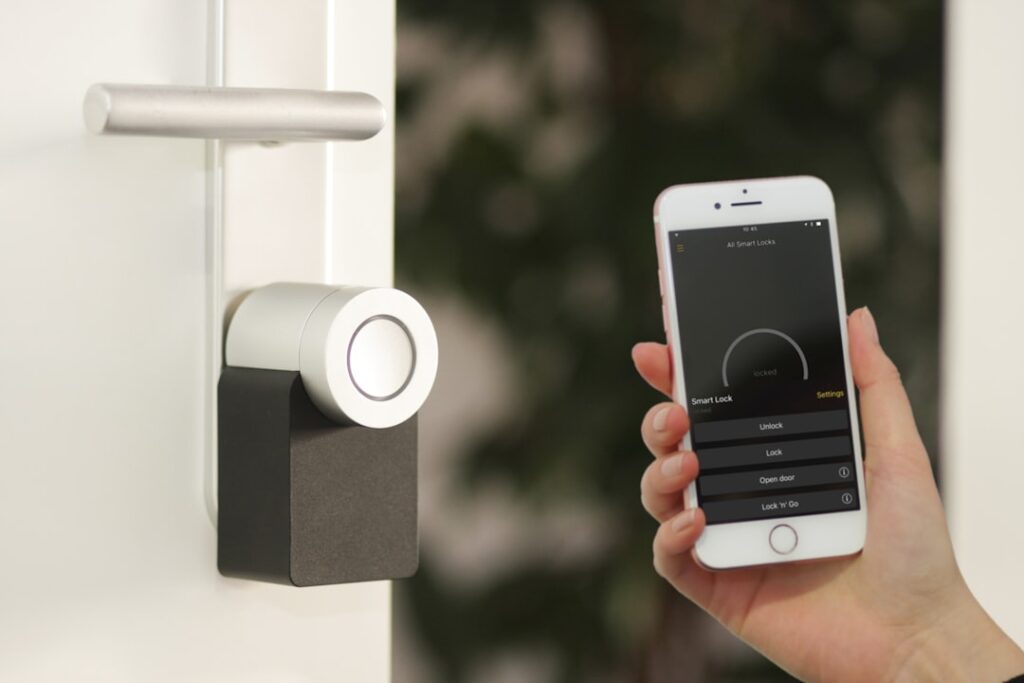
- App and voice control for remote lock/unlock, guest access codes, and activity logs
- Auto-lock that secures the door after a set interval
- Offline access codes that work even if Wi-Fi drops
The PIN Genie Keypad Explained
One of Lockly’s most distinctive features is the anti-peep keypad. On a normal keypad, repeated use leaves fingerprint wear or heat traces on the same digits, hinting at the code. Lockly’s PIN Genie randomizes the position of numbers within groups on the touchscreen every time, so your code is never in the same physical spot twice. This defeats both smudge analysis and someone watching over your shoulder, a genuinely clever security advantage that sets Lockly apart from competitors.
Video and Doorbell Performance
Because the camera is embedded in the lock at deadbolt height, its perspective is slightly lower than a traditional doorbell camera mounted higher on the frame. In practice it captures visitors well and, being close to the door, gives a clear face view. Two-way audio lets you tell a delivery driver where to leave a package or ask an unexpected visitor who they are without opening the door.
Night vision handles after-dark visitors, and motion alerts notify your phone when someone approaches. The doorbell button gives guests a familiar way to announce themselves, and the chime can route to your phone and optional indoor chime accessories.
Battery Life and Power
Combining a lock, camera, and doorbell in one device puts real demand on batteries, and this is the honest weak point of any all-in-one unit. The Vision Elite uses a rechargeable battery pack, and heavy camera use, frequent motion events, and cold weather all shorten the interval between charges. Expect to recharge more often than a camera-free smart lock, with real-world life ranging from a few weeks to a couple of months depending on traffic and settings.
Lockly mitigates this with a removable, rechargeable pack so you can swap in a charged one while the other refills, and the lock warns you well before it dies. Some homeowners hardwire power or add a solar-charging accessory where available to reduce the chore. If you dislike managing batteries, this is the trade-off to weigh most carefully.
Installation
The Vision Elite installs on a standard deadbolt prep, so if your door already has a deadbolt, the mechanical swap is within reach of a confident DIYer in about 30 to 60 minutes. You remove the old deadbolt, fit Lockly’s latch and exterior/interior assemblies, and connect them. Because the exterior half contains the camera and doorbell, cable routing between the two halves is a bit more involved than a plain lock, so follow the app’s guided setup carefully.
One consideration: the exterior unit is larger and heavier than a simple keypad lock, so verify it fits your door’s stile width and does not interfere with a storm door. Wi-Fi setup connects the device to your home network; a strong signal at the door is important for reliable video streaming.
Subscription and Ongoing Costs
As with most video devices, live view and real-time alerts work without a fee, but cloud video storage for reviewing past events typically requires a subscription. Factor this ongoing cost into your decision, since it adds up over the years just as it does with standalone doorbell cameras. Check Lockly’s current plan pricing and whether any local or free storage tier meets your needs before assuming you must subscribe.
How It Compares
The Vision Elite’s closest competition is not another single device but the combination of a standalone smart lock (like an August, Schlage Encode, or Yale) plus a separate video doorbell (like Ring or Nest). That two-device approach usually offers longer lock battery life and more mature camera software, but requires two purchases, two mounting jobs, and syncing across apps. Lockly’s pitch is integration and the unique anti-peep keypad. If a clean single-device install and the scrambling keypad appeal to you, the Vision Elite is compelling; if you prioritize the longest battery life and the most refined camera ecosystem, separate devices may serve you better.
Access Management for Households and Guests
One of the strongest reasons to choose a lock like the Vision Elite is flexible access control. Through the app you can issue permanent codes for family members, temporary codes for houseguests, and one-time or scheduled codes for a dog walker, cleaner, or contractor that automatically expire. Fingerprint enrollment lets regular occupants get in with a touch and no code at all, which is especially handy for children who lose keys.
The activity log records who came and went and when, so you can confirm a teenager arrived home from school or that a service person entered only during their scheduled window. Offline access codes are a critical feature here: because they work even when the internet is down, you are never locked out by a Wi-Fi outage. Setting up a sensible mix of permanent, temporary, and scheduled codes, plus fingerprints for the household, turns the lock into a genuine convenience rather than just a novelty, and eliminates the security risk of hiding a spare key under the mat.
Weather Resistance and Placement
Because the exterior half of the Vision Elite houses a camera, keypad, and fingerprint reader, its exposure to weather matters more than a plain deadbolt’s. The unit carries a weather-resistance rating, but a door that faces driving rain, direct afternoon sun, or extreme cold puts more stress on the electronics and battery. If your entry is fully exposed with no overhang, the lock will generally still function, but you can extend its life and reliability by ensuring good drainage and, where possible, some shelter from a storm door or porch roof.
Cold in particular affects both battery performance and the responsiveness of touch and biometric sensors, so homeowners in northern climates should expect shorter battery intervals in winter and keep a charged spare pack ready. A storm door can shelter the unit but may also trap heat in summer and interfere with the camera’s view or the door’s fit, so check clearances before committing. Thinking through placement and exposure up front helps the lock perform consistently across seasons.
Common Mistakes to Avoid
- Underestimating charging frequency. Heavy camera use drains the battery faster than a plain lock; keep a spare pack charged.
- Weak door Wi-Fi. Streaming video needs a solid signal; add a mesh node if the front door is a dead zone.
- Ignoring door fit. The large exterior unit may clash with a storm door or narrow stile; measure first.
- Skipping the subscription math. Budget for cloud storage if you want to review recorded events.
- Forgetting backup entry. Know your offline codes and any physical key backup in case of a total power loss.
Is It Worth It?
The Lockly Vision Elite video smart lock delivers on its promise of consolidating your door’s security into one intelligent device, and the scrambling PIN Genie keypad is a standout feature no doorbell-plus-lock combo can match. The honest caveats are battery management and the potential subscription cost. If you value the convenience of a single integrated unit and are willing to keep a charged battery on hand, it is a genuinely capable and secure choice for the front door. If maximum battery life and a mature camera platform matter more, weigh it against a dedicated lock-and-doorbell pairing before you buy.