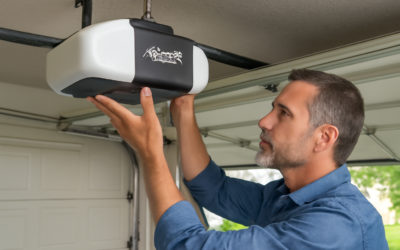
Ring built its name on video doorbells, but the garage is the door most families actually use, and that is where the confusion starts. There is no standalone Ring garage door opener motor; instead Ring offers smart control through its partnership with the myQ platform and its own retrofit accessory, letting you monitor and operate an existing opener from the Ring app. If you want your garage folded into the same app that runs your cameras and doorbell, this guide explains exactly what Ring offers, what it costs, and how to set it up.
Part of our Garage Doors guide — explore the full guide →
How Ring Handles the Garage
Ring does not manufacture a ceiling-mounted opener unit. What people mean by a Ring garage door opener is smart control layered onto the opener you already own. Ring accomplishes this through integration with Chamberlain’s myQ system and through Ring’s own smart-home accessories that report door status and trigger open or close commands.
The practical result is the same as a smart opener: you see whether the garage is open, get alerts when it moves, and can operate it remotely. The difference is that Ring works with your current opener rather than replacing the motor, which keeps the cost and installation low.
It helps to understand why the market works this way. Chamberlain’s myQ platform holds much of the smart-garage space, and rather than every camera company building its own opener, many integrate with existing standards or offer a retrofit controller that reads door position and pulses the opener’s terminals. Ring, owned by Amazon, fits its garage story into a broader home-security ecosystem where the door is one more monitored entry point alongside cameras, the doorbell, and contact sensors. The value is unification, not a standalone product.
What You Need to Get Started
Before buying anything, confirm you have the pieces that make Ring garage control work. You generally need:
- An existing garage door opener in good working order
- A smartphone with the Ring app installed
- Strong Wi-Fi reaching the garage
- A compatible smart controller, such as a myQ-based device or Ring accessory that links to your Ring account
Because integration paths shift as Ring and myQ update their partnership, verify current compatibility on Ring’s site before purchasing. Wi-Fi signal strength in the garage is the most common overlooked requirement; a weak connection makes remote control unreliable.
Installing the Retrofit Controller
Adding smart control to an existing opener uses a small controller wired to the opener’s terminals plus a door-position sensor. Installation is a straightforward DIY job that takes 30 to 45 minutes. The general steps are:
- Mount the controller unit on the ceiling or wall near the opener
- Run two low-voltage wires from the controller to the opener’s push-button terminals
- Attach the tilt sensor to the top panel of the garage door
- Plug in the controller and connect it to your home Wi-Fi through the app
- Link the device to your Ring account and test open, close, and status reporting
The wiring is low-voltage and safe, but always unplug the opener before touching its terminals. The tilt sensor is what tells the app whether the door is open or closed, so mount it as directed.
The two low-voltage wires connect to the same terminals your wall push-button uses, and touching them together is exactly what pressing the button does, so the controller simply automates that pulse. If your opener uses a modern proprietary wall console rather than simple terminals, the retrofit may need an adapter or may not support the direct-wire method, which is why confirming compatibility before you buy is so important. Mount the tilt sensor on the top section of the door where it clearly senses the change in angle between open and closed, and test that the app reports the state correctly before you trust it from a distance.
Using the Ring App for Control
Once linked, the garage appears in your app dashboard alongside cameras and doorbells. You can open or close the door with a tap, see real-time status, and set alerts that notify you whenever the door changes state. This is genuinely useful for the classic “did I close the garage?” moment on the highway.
You can also build automations, such as receiving a notification if the door stays open past a set time in the evening. Pairing the garage with a Ring camera lets you visually confirm the door and see who is coming and going, which is the real advantage of keeping everything in one ecosystem.
A mounted Ring camera aimed at the garage bay adds genuine value here. Instead of trusting a sensor alone, you can pull up a live view to confirm the door is truly down and nothing is blocking it before sending a close command from across town. Many owners set the camera to record a clip every time the door opens or closes, creating a visual log of every entry. Combined with motion alerts, this turns the garage from the most overlooked door in the house into one of the best-monitored.
Security and Safety Features
Smart garage control adds convenience but demands attention to safety. Federal safety rules require that a door closing via a remote command give an audible and visual warning, so a compliant smart controller beeps and flashes before the door moves. Never disable that warning.
On the security side, use a strong, unique password and enable two-factor authentication on your Ring account, since app access effectively becomes a key to your home. Grant shared access only to trusted household members, and review the activity log periodically to confirm every open and close was expected.
Think through the shared-access model carefully, because it is one of the real advantages of app-based control done right. Rather than handing out physical remotes or keypad codes that are hard to revoke, you invite family members to the account and remove them with a tap when needed, such as when a roommate moves out or a house sitter finishes. Every action stays tied to a named user in the log. That accountability, combined with a mandatory closing warning and two-factor login, makes a well-secured smart garage arguably safer than a stack of duplicate remotes floating around the household.
Costs and Value
The retrofit approach is far cheaper than replacing an opener. A smart garage controller typically runs $30 to $80, versus several hundred dollars for a new smart opener installed. Since it reuses your working opener, it is the sensible choice unless your current unit is old enough to warrant replacement anyway.
Factor in that some advanced app features across smart-home platforms occasionally sit behind a subscription. Weigh whether you want those extras or just basic remote control and status, which the base hardware provides. For most homeowners, the one-time hardware cost delivers everything they actually need.
Is Ring Garage Control Right for You
If you already run Ring cameras and a doorbell, adding garage control to the same app is a natural, low-cost upgrade that removes a real daily worry. If you use no Ring products, a standalone myQ or another smart-opener accessory may integrate more directly, so choose based on the ecosystem you already live in.
The bottom line is that a Ring garage door opener setup is really smart control bolted onto your existing motor, and that is a feature, not a limitation.
Troubleshooting Connectivity
Nearly every complaint with smart garage control comes down to Wi-Fi, since the garage is often the farthest, most signal-hostile corner of the house. Detached garages and homes with thick masonry walls frequently drop the connection. If your controller shows offline or responds slowly, test the signal strength at the garage with your phone before blaming the hardware.
The fix is usually a Wi-Fi extender, a mesh node placed near the garage, or an access point wired back to the router. Many controllers use only the 2.4 GHz band, which reaches farther than 5 GHz, so confirm your network offers a strong 2.4 GHz signal in the garage. Solving the connectivity first prevents the frustration of a smart door that only works half the time.
For a modest hardware cost and under an hour of work, you gain remote operation, status alerts, and the peace of mind of knowing your garage is closed no matter where you are. Verify current compatibility, ensure solid Wi-Fi in the garage, and secure your account, and the most-used door in your home becomes as smart and monitored as your front entry.
Frequently Asked Questions
Does the garage door still work if the Wi-Fi goes down?
Yes. The opener keeps working normally with its wall button, remotes, and keypad, because the smart controller only adds a parallel connection. What stops is app control, remote status checks, and alerts until the controller reconnects. Most controllers rejoin the network automatically once Wi-Fi returns, so check the app afterward to confirm the door status is reporting again.
Will the door stop if something is in the way when closing it from the app?
Yes, on a properly working opener. The photo-eye safety sensors near the floor and the opener’s auto-reverse feature work the same whether the close command comes from the app or the wall button. Test them monthly by placing an object in the door’s path. If the door does not reverse, stop using remote close and have the opener serviced.
Can you add smart control to a very old garage door opener?
Sometimes, but openers made before the early 1990s often lack photo-eye safety sensors, and most smart controllers require working sensors before they will allow remote closing. An opener that old is also near the end of its service life. In that case a new opener with built-in Wi-Fi is usually the better investment than retrofitting.
Does Ring make a garage door keypad?
Ring’s keypad is part of its alarm system and is used to arm and disarm security, not to open the garage. For code entry at the garage, use a wireless exterior keypad made for your opener brand, which mounts outside next to the door and programs to the opener like a remote. App control through the Ring app then covers remote operation.