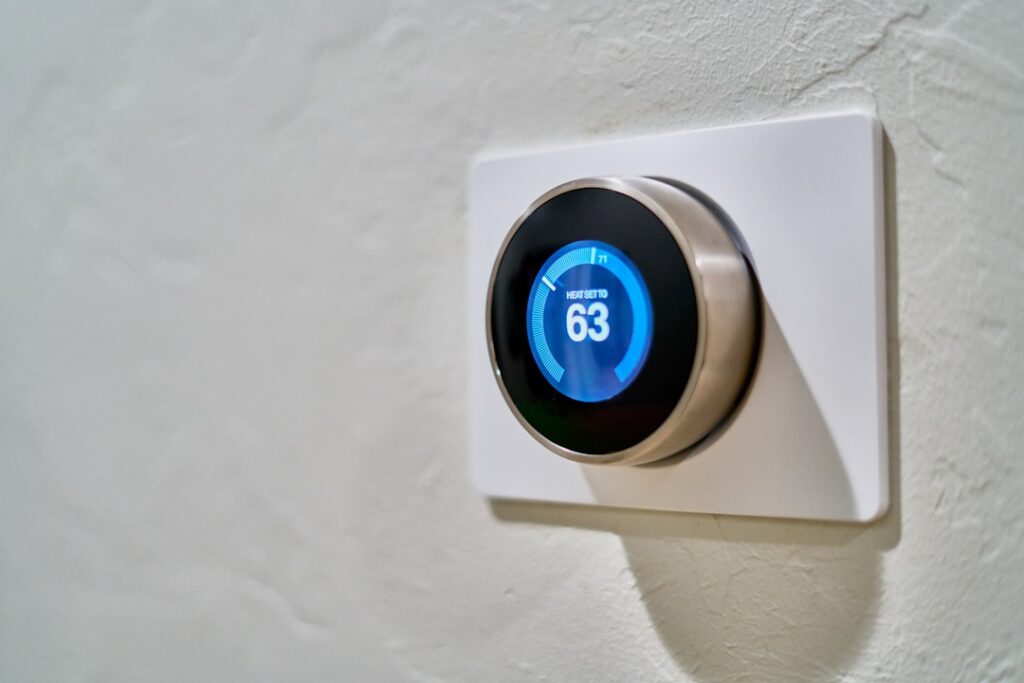
Smart thermostats promise energy savings and remote comfort control, but many homeowners hit a roadblock: their wiring lacks a common wire, or “C-wire,” to power the device. A battery powered smart thermostat solves this by running on batteries instead of requiring constant hard-wired power, making it ideal for older homes and simpler DIY installs. This guide explains how these thermostats work, the best models, real battery life, installation steps, and the trade-offs to consider before you buy.
- Why Battery Power Matters
- How Battery-Powered Models Work
- Top Battery-Powered Smart Thermostat Options
- Battery Life Expectations
- What They Cost
- Installation Steps
- Compatibility Considerations
- Common Mistakes to Avoid
- Smart Features You Still Get
- Energy Savings and Payback
- Troubleshooting Common Issues
- Is a Battery-Powered Model Right for You?
Why Battery Power Matters
Most Wi-Fi smart thermostats need continuous electricity to keep the display, sensors, and wireless radio running. That power traditionally comes from a C-wire in your HVAC wiring. Many homes, especially those built before smart devices were common, do not have a C-wire at the thermostat location. A battery powered smart thermostat sidesteps this by drawing its power from replaceable or rechargeable batteries, or by using clever power-sharing techniques over existing wires. This means you can enjoy smart features without running a new wire or hiring an electrician.
How Battery-Powered Models Work
There are two main approaches. Some thermostats run entirely on standard AA or AAA batteries that you replace periodically, drawing minimal power and relying on the batteries for the display and Wi-Fi. Others use a rechargeable internal battery that is trickle-charged by “power stealing” small amounts of energy from the heating and cooling wires when the system cycles. Power-stealing models avoid battery changes but can struggle on certain HVAC systems. Understanding which method a thermostat uses helps you predict maintenance and compatibility.
Top Battery-Powered Smart Thermostat Options
- Google Nest Thermostat (2020): Uses a rechargeable battery that power-steals; works without a C-wire on many systems and offers a sleek design.
- Amazon Smart Thermostat: Affordable, works with many systems, though a C-wire or adapter is recommended for best results.
- Honeywell Home models: Several run on AA batteries and offer reliable, no-C-wire operation.
- Emerson Sensi: Popular for easy battery-powered installation without a common wire on compatible systems.
Always check the manufacturer’s compatibility tool with your specific wiring before buying, since even battery-friendly models have system requirements.
Battery Life Expectations
Battery life varies by model and connectivity. Thermostats running on standard AA or AAA batteries typically last several months to over a year before needing fresh cells, with Wi-Fi usage being the biggest drain. The thermostat will alert you well in advance when batteries run low, so you are never caught off guard. Rechargeable power-stealing models like the Nest generally keep themselves charged during normal HVAC cycling, but on systems that rarely run or lack a compatible wire, the battery can deplete, causing the thermostat to go offline until it recharges. This is the most common complaint with power-stealing designs.
What They Cost
Battery-powered smart thermostats span a wide price range. Entry-level models like the Google Nest Thermostat and Amazon Smart Thermostat retail around $60 to $130, making them among the most affordable smart thermostats available. Mid-range Honeywell and Emerson Sensi units run $80 to $170. Because these thermostats often avoid the need for professional wiring, you save the $100 to $250 an electrician might charge to add a C-wire. Many utilities also offer rebates on ENERGY STAR smart thermostats, further lowering the effective cost.
Installation Steps
Installing a battery-powered smart thermostat is a genuinely DIY-friendly project. The general process is:
- Turn off power to your HVAC system at the breaker for safety.
- Remove the old thermostat cover and photograph the existing wiring for reference.
- Label each wire with the provided stickers according to the terminal it connects to.
- Disconnect the wires and remove the old base plate.
- Mount the new base plate, feeding the wires through, and level it.
- Connect each labeled wire to the matching terminal on the new thermostat.
- Insert batteries if required, attach the display, restore power, and complete Wi-Fi setup in the app.
The whole job usually takes thirty minutes to an hour, and the app walks you through configuration and testing.
Compatibility Considerations
Not every system suits a battery-powered thermostat. Most standard 24-volt central heating and cooling systems work well, but high-voltage baseboard heat, certain heat pumps with auxiliary heat, and some older or proprietary systems may not. Before purchasing, use the manufacturer’s online compatibility checker and match your existing wires to the supported configurations. If you have only two wires, a simple heat-only setup, battery power is often the easiest path. If your system is complex, confirm support carefully or consider a model that includes a C-wire adapter kit.
Common Mistakes to Avoid
- Skipping the compatibility check: Buying before verifying your wiring is the top cause of returns.
- Not labeling wires: Disconnecting without labels makes reconnection a guessing game.
- Ignoring power-stealing limits: On low-cycling systems, a rechargeable model may keep going offline.
- Forgetting the breaker: Working on live HVAC wiring risks shorts and shocks.
- Using the wrong batteries: Follow the manufacturer’s battery type; cheap cells drain faster.
Smart Features You Still Get
Going battery-powered does not mean giving up smart capabilities. These thermostats still offer remote control from your phone, scheduling and geofencing that adjust temperature when you leave or return, energy usage reports, and integration with Alexa, Google Assistant, or Apple Home depending on the model. Many learn your habits or suggest energy-saving schedules. The battery approach simply removes the wiring barrier while preserving the convenience and savings that make smart thermostats worthwhile in the first place.
Energy Savings and Payback
The main reason to install any smart thermostat is to save money and stay comfortable, and battery-powered models deliver the same savings potential as wired ones. By automatically lowering heating or cooling when you are asleep or away and returning to a comfortable temperature before you wake or arrive home, these devices cut wasted energy. ENERGY STAR estimates that a smart thermostat can save a typical household a meaningful percentage on heating and cooling costs each year, and features like geofencing and usage reports help you fine-tune further. Combined with a low upfront cost and frequent utility rebates, a battery-powered smart thermostat often pays for itself within a year or two through lower bills, making it one of the most cost-effective smart-home upgrades available.
Troubleshooting Common Issues
A few recurring issues affect battery-powered and power-stealing thermostats, and knowing them helps you avoid frustration. If a rechargeable model keeps going offline, the culprit is usually insufficient power-stealing on a system that does not cycle often; adding a C-wire adapter or an included power kit typically resolves it. If Wi-Fi drops, confirm the thermostat is on the 2.4 GHz band, since many do not support 5 GHz. Short battery life on a replaceable-cell model often points to heavy Wi-Fi use or low-quality batteries, so use fresh alkaline or lithium cells. If the heat or cooling does not respond after installation, double-check that each labeled wire is on the correct terminal against your setup photo. Most problems trace back to wiring or power, and the manufacturer’s app usually includes diagnostic tools to pinpoint the cause.
Is a Battery-Powered Model Right for You?
For homeowners in older houses without a C-wire, or anyone who wants a straightforward DIY upgrade, a battery powered smart thermostat is an excellent solution. It delivers the remote control, scheduling, and energy savings of a smart thermostat without the cost and hassle of new wiring. Just confirm compatibility with your HVAC system first, choose between replaceable-battery and rechargeable power-stealing designs based on your tolerance for maintenance versus occasional offline hiccups, and follow the labeled-wire installation carefully. Do that, and you will enjoy modern climate control and lower energy bills with a simple afternoon project.