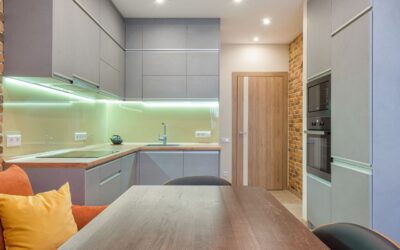

The fastest way to brighten a dim countertop, closet, or bookshelf is to skip the electrician entirely. Battery powered under cabinet lighting sticks up in minutes with adhesive backing, needs no outlet and no wiring, and comes off just as easily — making it perfect for renters, awkward spots without power, and anyone who wants light tonight, not after a rewire. The technology has improved dramatically: today’s LED battery lights are bright, long-lasting, and often motion-activated. Here is how to pick the right type and get the most from it.
Part of our Kitchen Remodeling guide — explore the full guide →
Why Go Battery Instead of Hardwired
Hardwired under-cabinet lighting looks great but demands an outlet or a licensed electrical connection, which many spots simply do not have. Battery lights solve real problems:
- No wiring or outlet required — ideal where there is no power source nearby.
- Renter-friendly — peel-and-stick mounting removes cleanly without damage.
- Fast install — most units go up in under five minutes with no tools.
- Portable — move them to a closet, pantry, RV, or shelf whenever needs change.
The trade-off is battery maintenance and generally lower sustained brightness than a hardwired run, but for accent and task lighting in the right spots, they are hard to beat for convenience.
The Three Main Types
Puck Lights
Small round lights, usually sold in sets of three to six with a remote. They throw focused pools of light, so space them evenly to avoid dark gaps between. Great for accent lighting, display shelves, and spot-lighting specific counter areas. Most run on AA or AAA batteries and include a remote for on/off, dimming, and sometimes color-temperature control.
Light Bars (Linear)
Rigid strips a few inches to a foot or more long that provide a more continuous, even wash than pucks. They suit under-cabinet task lighting well because the light spreads across the counter rather than pooling. Many are motion-activated and rechargeable.
Adhesive LED Strips
Flexible battery-powered tape you can cut and shape around corners for a continuous line of light. Best for accent effects and irregular runs, though battery-powered strips typically run shorter and dimmer than plug-in versions because of power limits.
Motion Sensors and Switching Options
How the light turns on matters for both convenience and battery life:
- Motion-activated: lights come on when your hand or body approaches and shut off after a set time. Perfect for closets, pantries, and under-cabinet task areas — and they save battery by only running when needed.
- Remote control: convenient for lights mounted out of easy reach, with dimming and grouping.
- Tap/touch: press the light itself to toggle it. Simple and reliable.
- Manual switch: a physical on/off, sometimes with a timer.
For a pantry or closet, motion activation is the standout feature — the light greets you the instant the door opens and never gets left on.
Batteries: Replaceable vs. Rechargeable
This is the single biggest factor in long-term satisfaction:
- Replaceable (AA/AAA): swap in fresh batteries when they die. No downtime charging, but ongoing battery cost. Great for lights used occasionally, like a closet.
- Rechargeable (built-in USB): recharge via USB cable when depleted, often lasting weeks per charge with motion activation. Lower running cost and no battery waste, but the light is out of service while charging — buy two if you want continuous coverage.
For frequently used task lighting, rechargeable USB models usually win on cost and hassle over time. For rarely used spots, simple AA-powered units are fine.
Battery Life Expectations
Runtime depends heavily on usage mode and brightness. A motion-activated light triggered a dozen times a day can run for weeks or months on a charge or set of batteries, because it is off most of the time. Lights left on continuously drain far faster — often just several hours to a couple of days at full brightness. To stretch battery life: use motion or timer modes, run at a lower brightness setting where available, and choose warm-white lights, which many units run more efficiently than cool white.
Choosing Color Temperature and Brightness
The same rules as any lighting apply. For a warm, cozy glow, look for 2700K to 3000K. For crisp task lighting to work by, 4000K neutral white shows detail better. Some units offer selectable color temperature via remote — a nice flexibility. On brightness, check the lumen rating: 50 to 100 lumens per light suits accent use, while task lighting over a counter benefits from brighter units or several lights working together.
Installation in Minutes
- Clean the mounting surface with rubbing alcohol so the adhesive grips.
- Decide placement — mount toward the front edge of the cabinet underside so light reaches the whole counter, not just the back.
- Peel the adhesive backing (or use the included magnetic bracket, which lets you remove the light for charging) and press firmly.
- Space multiple pucks or bars evenly to avoid dark gaps.
- Insert or charge the batteries, set your mode, and test.
Magnetic mounting brackets are a smart feature to look for on rechargeable units — the light snaps off for charging and snaps right back into place.
Best Uses for Battery Lights
- Kitchen under-cabinet task lighting where no outlet exists
- Closets and pantries with motion activation
- Display shelves, cabinets, and bookcases for accent lighting
- Rental units where you cannot alter wiring
- Garages, sheds, RVs, and utility spaces
The Bottom Line
For instant, wire-free lighting exactly where you need it, battery powered under cabinet lighting is tough to beat. Choose motion-activated, rechargeable units with magnetic mounts for the least maintenance and best convenience, mount them toward the front of the cabinet, and pick a color temperature that fits the space. It is the rare home upgrade you can complete in the time it takes to unbox it — no electrician, no outlet, no commitment.