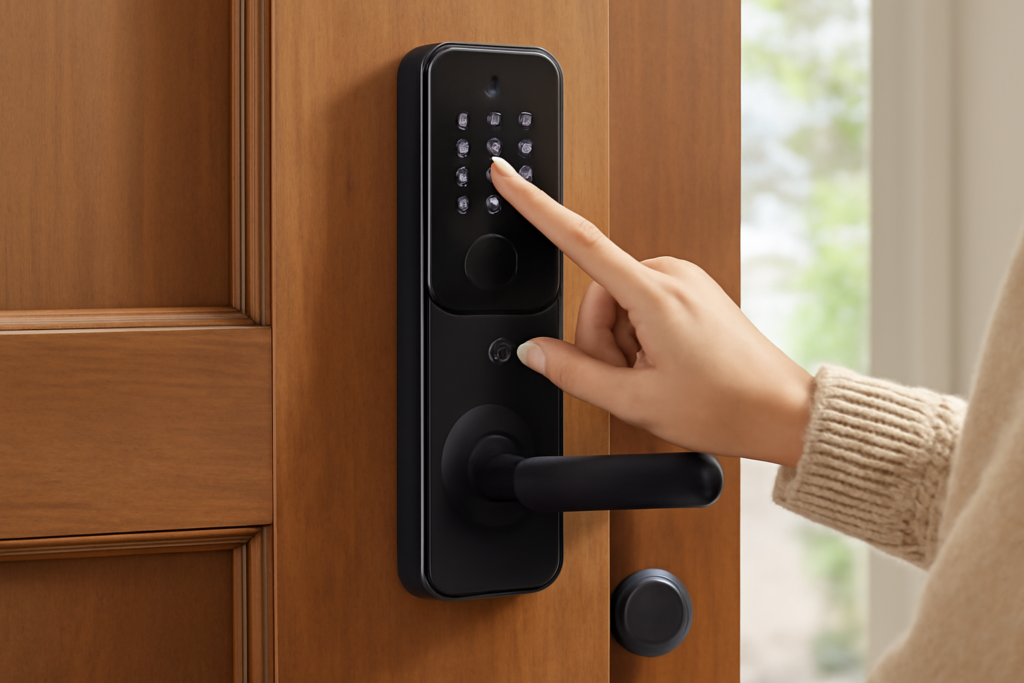
The eufy familock s3 max smart lock stands out in a crowded market of connected door locks by introducing palm vein recognition, a biometric method more commonly seen in high-security commercial settings than on a home front door. Combined with fingerprint, keypad, app, and traditional key access, the FamiLock S3 Max positions itself as an all-in-one entry solution with a built-in video camera. This guide walks through its standout features, how the unlock methods work, installation, battery life, and whether it earns a place on your door.
- What Makes the FamiLock S3 Max Different
- The Unlock Methods
- The Built-In Camera
- App and Smart Home Integration
- Battery Life and Charging
- Installation
- Security Considerations
- Who Should Consider It
- Common Questions and Mistakes
- Is It Worth It?
- Setting Up Users and Guest Access
- Weather and Durability Considerations
- How It Compares to Other Smart Locks
What Makes the FamiLock S3 Max Different
Most smart locks rely on fingerprint sensors, keypads, and phone apps. The FamiLock S3 Max adds palm vein recognition, which scans the unique pattern of veins beneath the skin of your palm using infrared light. Because vein patterns are internal, they are extremely difficult to spoof and are not affected by dirty, dry, or worn fingertips that sometimes trip up fingerprint readers. Eufy pairs this with an integrated camera, turning the lock into a combined entry system and video doorbell-style device, which is an unusual and genuinely useful combination.
The Unlock Methods
The FamiLock S3 Max is built around convenience with multiple ways to get in, so every member of the household has an option that suits them:
- Palm vein recognition: Wave your palm near the reader for touchless, highly secure entry that works even with gloves off and messy hands.
- Fingerprint: A fast traditional biometric for quick recognized entry.
- Keypad code: Enter a PIN, useful for guests and children, with the ability to set temporary codes.
- App unlock: Open the lock remotely through the eufy Security app from anywhere.
- Physical key: A mechanical keyway as a reliable backup if power ever fails.
Having a physical key backup is reassuring, since it means a dead battery never locks you out of your own home.
The Built-In Camera
A defining feature is the integrated camera, which lets you see who is at the door, capture video of approaches, and in many configurations receive alerts when someone lingers. This effectively merges a smart lock and a video doorbell into one device on the door itself, reducing hardware clutter. The camera ties into the eufy Security ecosystem, which is known for offering local storage options rather than forcing everything into a paid cloud subscription, an approach privacy-minded buyers appreciate.
App and Smart Home Integration
The lock is managed through the eufy Security app, where you enroll palms, fingerprints, and codes, review entry logs, watch camera footage, and grant temporary access to guests. Entry logs are a practical everyday benefit, letting you confirm when kids got home from school or when a dog walker came by. Depending on the model configuration and firmware, eufy locks commonly work with voice assistants and broader smart home platforms, so check current compatibility for your preferred ecosystem if integration with other devices matters to you.
Battery Life and Charging
Smart locks with cameras draw more power than simple biometric locks, so battery life is a fair concern. The FamiLock S3 Max uses a large rechargeable battery designed to last months between charges under typical use, though heavy camera activity shortens that. When it runs low, the app sends alerts well in advance, and recharging is done via a cable rather than swapping disposable batteries, which saves money and hassle over time. The physical key backup covers you in the rare event the battery fully depletes before you recharge.
Installation
Like most retrofit smart locks, the FamiLock S3 Max is designed to replace an existing deadbolt and fit standard US door prep, meaning a door bored for a common deadbolt with a typical backset. Installation is a realistic DIY job with a screwdriver, generally taking 30 to 60 minutes. The basic sequence is removing your old deadbolt, installing the new latch and strike, mounting the exterior unit with the reader and camera, connecting it to the interior unit, and inserting or attaching the battery. After the hardware is on, you enroll users in the app. Doors that are non-standard, very thick, or unusually prepped may need adjustment, so confirm your door specs against the product requirements before buying.
Security Considerations
Palm vein recognition is one of the more secure consumer biometrics because the identifying pattern is internal and hard to copy, unlike a fingerprint that can be lifted from surfaces. Combined with a physical key backup and encrypted app communication, the lock offers strong security. As with any connected device, keep the firmware updated, use a strong unique password on your eufy account, and enable two-factor authentication where available. Position the camera thoughtfully and be mindful of local laws and neighbor privacy if it captures areas beyond your own property.
Who Should Consider It
The FamiLock S3 Max makes the most sense for households that want the convenience of touchless, reliable biometric entry for multiple family members, plus the security awareness of an integrated camera, all in a single door device. It is especially appealing to buyers who dislike ongoing cloud subscription fees, given eufy’s local-storage leanings. Families with young children benefit from entry logs and temporary codes, and anyone whose fingerprints are hard to read due to work or age may find palm vein recognition more dependable.
Common Questions and Mistakes
A common concern is what happens during a power failure; the physical key backup answers that, so keep a spare key somewhere safe outside the home. Another frequent mistake is not confirming door compatibility before purchase, leading to fit problems; measure your door thickness and backset first. Buyers also sometimes forget to enroll a backup unlock method for each user, so if one method fails, that person is stuck; enroll at least two methods per person. Finally, neglecting firmware updates over time can leave security gaps, so keep the app and lock current.
Is It Worth It?
The FamiLock S3 Max sits at the premium end of the smart lock market, and its price reflects the palm vein technology and integrated camera. For buyers who value cutting-edge, hard-to-spoof biometrics, a built-in camera that reduces device clutter, and freedom from mandatory cloud fees, it delivers a compelling package. Shoppers who only need basic keypad or fingerprint entry can spend less on a simpler lock, but for an all-in-one, future-facing entry system, the S3 Max is a strong contender.
Setting Up Users and Guest Access
One of the practical strengths of the FamiLock S3 Max is flexible user management through the app. You can enroll each household member with their preferred combination of palm, fingerprint, and code, and label each entry so the access log clearly shows who came and went. For guests, cleaners, or contractors, you can issue temporary or scheduled codes that work only during certain hours or expire on a set date, so a dog walker gets weekday access without a permanent credential. This granular control is far more secure and convenient than handing out physical keys that could be copied, and revoking access is as simple as deleting a code in the app rather than rekeying a lock.
Weather and Durability Considerations
Because the exterior unit houses the palm and fingerprint readers plus a camera, it must withstand year-round outdoor exposure. Smart locks like this are built with weather resistance in mind, but placement still matters. A door that gets direct, driving rain or harsh sun all day puts more stress on any electronic hardware, so a covered porch or a door with an overhang helps the lock and camera last longer and perform more reliably. In very cold climates, confirm the operating temperature range meets your winter lows, and keep the reader surfaces clear of ice and snow so the biometrics read cleanly. A little thought about the door’s exposure pays off in longevity.
How It Compares to Other Smart Locks
Against mainstream competitors, the FamiLock S3 Max differentiates itself in two clear ways: the palm vein biometric and the integrated camera with local-storage leanings. Many popular smart locks offer fingerprint and keypad entry but lack a built-in camera, forcing you to buy a separate video doorbell, and several tie their best features to monthly cloud subscriptions. The eufy approach bundles more into one device and leans toward storing footage locally, which appeals to buyers wary of recurring fees and cloud privacy. The trade-off is a higher upfront price and reliance on the eufy ecosystem, so buyers deeply invested in a competing smart-home platform should confirm compatibility before committing.
The eufy FamiLock S3 Max smart lock combines palm vein recognition, fingerprint, keypad, app, and key access with an integrated camera and local-storage-friendly ecosystem, making it one of the most feature-rich home locks available. Confirm your door compatibility, enroll multiple unlock methods per user, keep a spare key handy, and stay current on firmware, and you will have a secure, convenient, and genuinely modern front door.