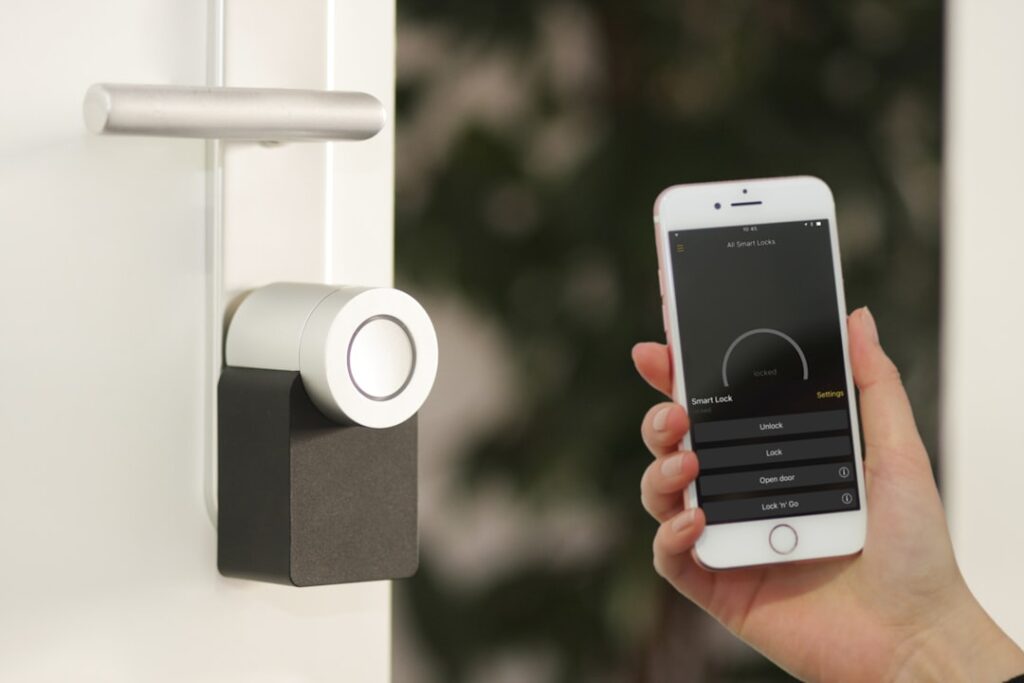
A smart door knob replaces the fumble for keys with a code, a fingerprint, a phone tap, or a voice command — and it lets you lock up, check the door, and hand out access codes from anywhere. For anyone who’s been locked out, juggled keys with full hands, or wanted to let a dog walker in without hiding a key under the mat, the appeal is obvious. But the smart-lock market is crowded and confusing. Here’s a straight-talking guide to how they work, what matters, and how to choose one that’s both convenient and secure.
- What Counts as a “Smart” Door Knob
- Types of Smart Locks
- Security: Look Past the Convenience
- Smart-Home Compatibility
- Battery Life and the Dead-Battery Question
- Installation: Easier Than You Think
- Features Worth Paying For
- Making the Choice
- Common Concerns (and the Real Answers)
- Maintenance and Battery Habits
- Frequently Asked Questions
What Counts as a “Smart” Door Knob
The term covers a range of products. Strictly, most keyless smart entry hardware is a deadbolt, but “smart door knob” is commonly used for any electronic lock — including lever and knob-style handle sets with electronic guts. What makes it smart is some combination of these unlock methods:
- Keypad codes: Punch in a PIN. The most reliable, works even if your phone is dead.
- Fingerprint (biometric): Touch a sensor; unlocks in under a second.
- Bluetooth/app: Auto-unlock as you approach with your phone.
- Wi-Fi: Lock, unlock, and check status from anywhere; get alerts.
- Voice/hub: “Alexa, lock the front door” via a smart-home assistant.
Most quality models still include a physical key backup, and the best ones layer several methods so you always have a way in.
Types of Smart Locks
Full Replacement Deadbolt
The most common: you remove your old deadbolt and install the whole smart unit, keypad and all. Brands like Schlage Encode, Yale Assure, and Kwikset Halo lead here. Full control, full features, but you replace the entire lock.
Retrofit (Interior-Only)
Devices like the August Smart Lock mount over your existing deadbolt’s interior thumbturn. Your keys and exterior hardware stay the same — great for renters — but you don’t get an exterior keypad unless you add one.
Handle Set with Electronic Lock
Combines a keyed or keypad handle/knob with the deadbolt in one cohesive set, for a coordinated look on the whole entry.
Security: Look Past the Convenience
A smart lock is only worth having if it’s actually secure. Prioritize:
- ANSI/BHMA Grade: Aim for Grade 1 or 2 for the physical deadbolt mechanism — this rates its resistance to force, independent of the electronics.
- Encryption: Reputable brands use AES 128-bit encryption for wireless communication so codes can’t be sniffed.
- Auto-lock: The single most valuable feature — the door relocks itself after a set time, so you never leave it unsecured.
- Tamper and forced-entry alerts: Notifications if someone fiddles with the lock or enters wrong codes repeatedly.
- Code management: The ability to issue temporary or scheduled codes for guests and revoke them remotely.
Remember the whole-door principle: even the best lock is useless in a weak door or jamb. Reinforce the strike plate with 3-inch screws into the framing.
Smart-Home Compatibility
Decide how the lock fits your ecosystem before buying. Match it to what you already use:
- Apple Home (HomeKit): Fewer options, but tight integration and strong privacy — look for HomeKit or the newer Matter support.
- Amazon Alexa / Google Home: Widely supported; enables voice control and routines.
- Matter/Thread: The emerging cross-platform standard — a Matter-certified lock works across ecosystems and is more future-proof.
- Wi-Fi vs. Bridge: Some locks have Wi-Fi built in; others need a plug-in bridge for remote access. Built-in Wi-Fi is simpler but uses more battery.
Battery Life and the Dead-Battery Question
Smart locks run on batteries — usually 4 AA cells — lasting 3 to 12 months depending on how much Wi-Fi they use (Wi-Fi models drain faster than Bluetooth). Good locks warn you weeks ahead with app alerts and beeps. And for the moment you ignore those warnings: most keypad locks have exterior 9-volt jump-start terminals or a keyhole backup so a dead battery never locks you out. Confirm your chosen model has a backup entry method — it’s a non-negotiable.
Installation: Easier Than You Think
Installing a full-replacement smart lock is a genuine DIY job, usually 20 to 30 minutes with a screwdriver:
- Remove the old deadbolt: interior screws first, then pull both halves and the bolt.
- Confirm your door’s backset (2-3/8 or 2-3/4 inch) and thickness (1-3/8 to 1-3/4 inch standard) — most locks adjust.
- Install the new latch/bolt in the edge, beveled correctly.
- Mount the exterior keypad, feeding its cable through the bolt.
- Attach the interior body, connect the cable, and add batteries.
- Run the app setup: calibrate the lock direction, set your master code, and connect Wi-Fi.
Retrofit models are even faster since the exterior hardware stays put.
Features Worth Paying For
Beyond the basics, a few features genuinely improve daily life. Auto-unlock via geofencing senses your phone approaching and unlocks hands-free. Guest scheduling lets you give the cleaner a code good only on Tuesday mornings. Activity logs show who came and went and when — useful for keeping tabs on kids or contractors. Integration with a video doorbell lets you see and let someone in from one app. Decide which of these you’ll actually use; paying for a fingerprint reader you’ll never touch is money wasted.
Making the Choice
Start by matching a smart door knob to your smart-home platform and your door’s existing hardware, then insist on a solid ANSI grade, encryption, auto-lock, and a battery backup entry method. For most homeowners, a keypad-plus-app deadbolt from Schlage, Yale, or Kwikset hits the sweet spot of security and convenience at $120 to $300. Renters or the cautious can start with an interior-only retrofit and keep their keys. Whichever you pick, you’ll wonder how you ever tolerated digging for keys in the dark.
Common Concerns (and the Real Answers)
New buyers usually raise the same worries, and most have reassuring answers:
- “Can it be hacked?” Reputable locks use AES 128-bit encryption; the far likelier attack is still physically forcing a weak door. Reinforce the jamb and you’ve addressed the bigger risk.
- “What if the power’s out?” Smart locks run on their own batteries, not house power, so an outage doesn’t lock you out. Dead batteries are handled by keyhole or 9V jump-start backups.
- “Will it work in winter?” Quality models are rated for outdoor temperature swings, but keypads and fingerprint readers can slow in extreme cold — a keypad plus a physical key backup covers you.
- “Can guests get in without my phone?” Yes — that’s the point of keypad codes. Issue a PIN, set it to expire, and revoke it remotely when you like.
Maintenance and Battery Habits
A smart lock needs a little upkeep a traditional lock doesn’t. Change the batteries proactively when the app warns you rather than waiting for a lockout, and use fresh alkaline (or the lithium cells the maker recommends) rather than bargain cells that fade fast in cold. Keep the keypad and fingerprint sensor clean so reads stay reliable. Update the lock’s firmware through its app when prompted — those updates patch security and fix bugs. And keep your physical backup key somewhere accessible but not on the porch. Twice a year, check that the deadbolt throws fully without binding; a misaligned strike makes the motor work harder and drains batteries faster.
Frequently Asked Questions
Do I need a professional to install one?
No. A full-replacement deadbolt is a 20-to-30-minute DIY job with a screwdriver, and retrofit models are even faster. Confirm your door’s backset and thickness first.
Which platform should I buy for?
Match the lock to what you already use — Apple Home, Alexa, or Google. A Matter-certified lock works across ecosystems and is the most future-proof choice.
How long do the batteries last?
Typically 3 to 12 months. Bluetooth models last longer than Wi-Fi models, which use more power for remote access. The app warns you well before they die.