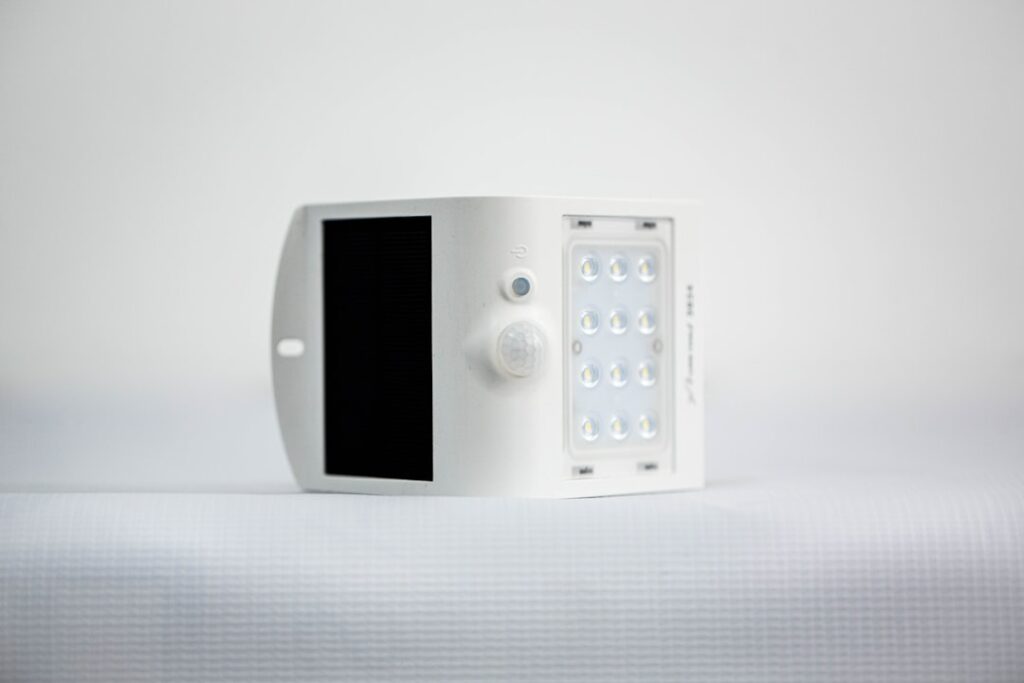
A wireless motion sensor light gives you automatic illumination exactly where you need it without hiring an electrician or fishing cable through walls. Powered by batteries or a small solar panel, these fixtures switch on the instant they detect movement and shut off after a set delay, making them ideal for closets, stairwells, garages, entryways, and dark side yards. For homeowners who want a quick security or convenience upgrade in an afternoon, few products deliver more for less effort and money.
- How Wireless Motion Lights Work
- Battery vs Solar vs Rechargeable
- Brightness, Measured in Lumens
- Detection Range and Angle
- Where to Place Them
- Installation in Minutes
- Settings Worth Adjusting
- Common Frustrations and Fixes
- Cost and Value
- Smart and Connected Options
- Warm vs Cool Light and Color Rendering
- Getting the Most Battery Life
How Wireless Motion Lights Work
Nearly all of these lights use a passive infrared, or PIR, sensor. The sensor reads the infrared heat signature of a person, animal, or vehicle moving across its field of view. When the heat pattern shifts, the light triggers. Because PIR detects heat movement rather than visible motion, it works in total darkness, which is the whole point. The unit stays in a low-power sleep state until motion wakes it, which is how a set of batteries can last months. The lack of wiring is what makes them wireless; the power source rides onboard.
Battery vs Solar vs Rechargeable
The power source is your first major decision, and each type suits different spots.
- Disposable battery models: Usually run on AA or AAA cells, sometimes C or D for brighter units. Perfect for interior locations like closets, pantries, and hallways where sunlight never reaches. Batteries last three months to a year depending on traffic and brightness.
- Solar-powered outdoor lights: A photovoltaic panel charges an internal lithium battery by day and runs the light at night. Best for fences, sheds, driveways, and garden paths that get several hours of direct sun. No battery changes, but performance drops in winter and heavy shade.
- USB-rechargeable models: A built-in battery you top up with a cable every few weeks. Common in sleek under-cabinet strips and closet bars. They avoid disposable battery waste but require you to remember to recharge them.
Brightness, Measured in Lumens
Wattage is meaningless for LED fixtures; look at lumens instead. For a closet or cabinet, 50 to 200 lumens is plenty. A hallway or stair wants 200 to 500 lumens. Outdoor security fixtures for a driveway or backyard should deliver 500 to 1,500 lumens or more to actually light an area and deter intruders. Higher output drains batteries faster, so match the brightness to the task rather than buying the brightest thing on the shelf and swapping cells every month.
Detection Range and Angle
Two specs govern how well a light catches motion: range and field of view. Indoor closet lights may only sense 10 feet across a 100-degree arc, which is all a small space needs. Outdoor security units reach 20 to 40 feet with a 120 to 180-degree spread. Wider is not always better; a light aimed at a busy sidewalk will trigger constantly and drain its battery. Aim the sensor across the path of expected travel rather than straight down it, since PIR detects side-to-side movement more reliably than motion coming directly toward it.
Where to Place Them
The best value comes from targeting genuine pain points in your home.
- Closets and pantries where fumbling for a pull chain is a daily annoyance.
- Stairwells and hallways for safe nighttime trips without hunting for a switch.
- Garages and sheds that lack overhead lighting or a convenient switch by the door.
- Entry doors and porches to greet you and discourage prowlers.
- Under kitchen cabinets for task lighting on the counter.
Installation in Minutes
The appeal of a wireless motion light is the near-zero install effort. Most stick up with the included 3M adhesive pad or a couple of screws and a mounting bracket. There is no junction box, no wire nuts, and no power to shut off. For outdoor solar units, the only real task is choosing a mounting height, typically 6 to 8 feet for security coverage, and orienting the panel toward the sun. Test the detection zone by walking the area at night before committing the adhesive, because peeling a stuck pad off painted drywall can lift the paint.
Settings Worth Adjusting
Better models include small dials or switches for timing and light sensitivity. The time delay controls how long the light stays on after the last motion, usually adjustable from 10 seconds to several minutes. A short delay saves battery in a closet; a longer one is friendlier on a porch. The lux or daylight setting tells the unit to stay dark during daytime so it does not waste power triggering in bright sun. Set both once during installation and forget them.
Common Frustrations and Fixes
The number-one complaint is false triggering, often from a heat source like a nearby dryer vent, a swaying sun-warmed branch, or a pet. Reposition or lower the sensitivity to solve it. The second is short battery life, usually caused by mounting a high-lumen light in a high-traffic zone; drop the brightness or switch to a solar or plug-in unit. Solar lights that die by midnight are typically starved of sun, so relocate the panel. Finally, cheap units can have a slow trigger lag, leaving you in the dark for a beat, so read reviews for responsiveness before buying for a stairwell.
Cost and Value
Interior battery closet lights run $10 to $25 for a two or three-pack. Quality USB-rechargeable strips cost $20 to $40. Outdoor solar security lights range from $20 for a basic single head to $60 for bright dual-head units with adjustable panels. Compared with the $150 to $300 an electrician would charge to add a single hardwired fixture and switch, wireless motion lights are an unbeatable bargain for spots that only need occasional light.
Smart and Connected Options
A growing category of wireless motion lights connects to your phone or smart-home system over Wi-Fi or Bluetooth. These let you receive a notification when motion is detected, adjust brightness and timing from an app, set schedules, and in some cases view a small camera feed. Battery-powered smart lights trade some runtime for these features, since the radio draws extra power, so many connected models are rechargeable or solar to compensate. If you already run a smart-home platform, look for lights compatible with your ecosystem so you can trigger other devices, such as having a detected motion at the back door turn on interior lights too. For a simple closet, though, a basic non-connected light is more reliable and never needs a firmware update.
Warm vs Cool Light and Color Rendering
Color temperature, measured in Kelvin, shapes how a space feels and functions. A warm 2700K to 3000K light casts a soft, yellowish glow that feels cozy and suits entryways, hallways, and bedrooms. A neutral 4000K reads clean and natural, good for closets and utility areas. A cool 5000K to 6500K daylight tone maximizes visibility and alertness, ideal for garages, workspaces, and security applications where you want to see clearly. Some premium fixtures let you switch between temperatures. Also consider the color rendering index, or CRI; a higher CRI makes colors look true, which matters in a closet where you are matching clothing, less so in a garage where you just need to see.
Getting the Most Battery Life
Battery-powered lights live or die by how you set them up. Mounting a high-lumen fixture in a heavily trafficked spot means constant triggering and frequent battery swaps, so match brightness to actual need and use the shortest acceptable time delay. Enable the dusk-to-dawn setting so the light never wastes power triggering in daylight. In cold garages and outdoor spots, lithium batteries dramatically outperform alkaline cells, which lose capacity in the cold and can leak. For rechargeable and solar units, clean the solar panel periodically and position it for maximum winter sun, when days are short and charging is weakest. These small habits can double the interval between battery changes or recharges.
A wireless motion sensor light solves the everyday problem of dark, switchless spaces with a device you can mount in five minutes and forget. Match the power source to the location, size the lumens to the task, aim the sensor across the traffic path, and tune the timing, and you will have reliable hands-free lighting that boosts both safety and convenience without touching your home’s wiring.