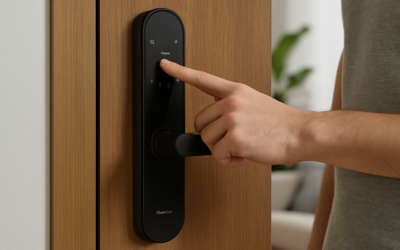
Smart locks have moved from novelty to genuinely useful, and the Aqara Smart Lock U300 is one of the more compelling options for homeowners who want keyless entry without sacrificing their existing deadbolt look. It combines a fingerprint reader, keypad, app control, and Apple Home Key tap-to-unlock in a single retrofit-friendly package. This guide covers what it does, how to install it, what works with it, and whether it belongs on your front door.
What the U300 Actually Is
The U300 is a retrofit smart lock, meaning it replaces the interior portion of your existing deadbolt while keeping your current exterior keyway and, in many cases, your existing keys. On the outside it adds a slim keypad and fingerprint reader; on the inside it houses the motor, batteries, and thumb-turn. This design appeals to renters and homeowners who want to keep their door’s exterior appearance and their physical key as a backup while gaining modern smart features. It is part of Aqara’s broader smart-home ecosystem, which spans sensors, cameras, and hubs.
Ways to Unlock
Flexibility is the U300’s strong suit. You can open the door multiple ways:
- Fingerprint: A fast, reliable reader stores multiple prints for family members.
- Keypad PIN codes: Assign permanent, temporary, or one-time codes, ideal for guests, cleaners, or dog walkers.
- Apple Home Key: Tap an iPhone or Apple Watch to the lock to unlock, no app needed.
- App control: Lock, unlock, and monitor status remotely through the Aqara Home app.
- Physical key: Your original deadbolt key still works as a fail-safe.
- Auto-unlock and auto-lock: Hands-free entry and automatic re-locking after a set time.
Smart Home Compatibility
The U300 supports Apple Home (HomeKit) including the tap-to-unlock Home Key feature, which is a headline draw for iPhone households. Through an Aqara hub, it also connects to the broader Aqara ecosystem for automations, such as unlocking triggering lights or a camera clip. Support extends to major voice assistants for status and control, though the deepest, most seamless integration is with Apple Home. If you are heavily invested in a specific platform, verify current compatibility on Aqara’s site before buying, since integrations evolve. Buyers who want a Thread or Matter-native experience should confirm the exact model variant’s protocol support.
What You Need Before Installing
Before ordering, confirm the lock fits your door. Check these points:
- You have a standard deadbolt, not a mortise or multipoint lock (unless a compatible variant exists).
- Your door thickness falls within the lock’s supported range, typically around 1.4 to 2 inches.
- Your backset (distance from door edge to bolt center) is a standard 2-3/8 or 2-3/4 inches.
- You have a basic screwdriver and about 30 minutes.
The retrofit design means most installs need no drilling and no new holes, a major advantage over full-replacement smart locks.
Step-by-Step Installation
- Remove the interior side of your existing deadbolt, leaving the exterior cylinder and the bolt mechanism in place.
- Mount the U300 baseplate using the provided screws and adapters sized to your deadbolt.
- Attach the exterior keypad/fingerprint unit and route its cable to the interior according to the guide.
- Install the interior body over the thumb-turn, connecting the cable and battery pack.
- Insert batteries and power on.
- Pair with the Aqara Home app, then calibrate the lock so it learns the locked and unlocked positions.
- Enroll fingerprints, set PIN codes, and add it to Apple Home by scanning the setup code.
Calibration is the step people rush; letting the lock fully learn its travel prevents jamming and failed auto-locks later.
Battery Life and Power
The U300 runs on replaceable batteries, typically AA cells, and Aqara rates battery life in the range of many months to about a year under normal use, depending on how often fingerprint, keypad, and auto features are triggered. The app sends low-battery alerts well before power runs out. If the batteries ever die completely, you still have the physical key backup, and some models include an emergency power option. Using rechargeable or fresh alkaline AAs and disabling features you do not use, like constant auto-unlock geofencing, extends the interval between changes.
Strengths and Weaknesses
The U300’s strengths are clear: easy retrofit install, multiple unlock methods, Apple Home Key support, and the flexibility of temporary guest codes. It keeps your existing key and exterior look, which renters and traditionalists appreciate. On the downside, the interior unit is bulkier than a plain thumb-turn, the Aqara app has a learning curve, and getting the most out of the ecosystem often means buying an Aqara hub. Non-Apple households lose the marquee Home Key feature, though the keypad and fingerprint still work independently of any platform.
Is It Worth It?
Priced competitively against other keypad-and-fingerprint smart locks, the Aqara Smart Lock U300 delivers strong value, especially for iPhone owners who want tap-to-unlock Home Key access and a clean retrofit that preserves their existing deadbolt. It is a smart pick for busy households juggling kids, guests, and service providers who need temporary codes, and for anyone tired of hiding a spare key under the mat. If you have an unusual door, a mortise lock, or no interest in a smart-home app, a simpler standalone keypad deadbolt may serve you better.
Managing Access Codes and Users
One of the biggest day-to-day benefits of the U300 is granular control over who can enter and when. Through the Aqara Home app you can create permanent codes for household members, recurring codes that work only on certain days or hours (perfect for a weekly cleaner or dog walker), and one-time codes that expire after a single use, ideal for a delivery or a contractor. You can revoke any code instantly from your phone, so there is no more re-keying locks when a house guest leaves or a service ends. The app also logs entry events, letting you see when each person or code opened the door, which brings real peace of mind for parents tracking when kids get home from school.
Security and Privacy Considerations
A smart lock is only worth having if it is genuinely secure, and there are habits that keep the U300 safe. Use unique PIN codes for each user rather than sharing one, so you can trace and revoke access individually. Enable any anti-peep or scramble feature that lets you enter random digits before your real code to disguise it from onlookers. Keep the lock’s firmware updated through the app, since manufacturers patch vulnerabilities over time. Because the fingerprint and keypad data is stored and processed locally on the device, your biometric information is not floating around the cloud. As with any connected device, secure your home Wi-Fi with a strong password and keep your Aqara and Apple accounts protected with two-factor authentication.
Troubleshooting Common Issues
Most U300 problems trace to a handful of causes with straightforward fixes. If the bolt jams or fails to fully throw, recalibrate the lock so it relearns the locked and unlocked positions, and check that your deadbolt turns freely by hand, since a sticky mechanical lock will defeat any motor. If the fingerprint reader struggles, clean the sensor and re-enroll prints, registering the same finger a couple of times at slightly different angles. Connectivity drops usually mean weak Wi-Fi or hub signal at the door; relocating the hub closer helps. Fast-draining batteries often indicate overuse of auto-unlock geofencing or a nearly worn set of cells, so swap in fresh alkalines and trim unused features. When all else fails, your physical key backup guarantees you are never locked out.
Confirm your deadbolt and door dimensions before buying, take your time with calibration during setup, and the U300 rewards you with fast, flexible, keyless entry that fits right onto the door you already have.