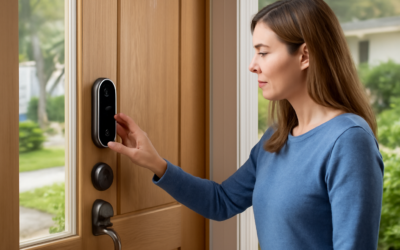
A Yale smart lock with Matter gives you keyless entry that works across Apple Home, Google Home, and Amazon Alexa from one lock, instead of being trapped in a single brand’s app. Matter is the new cross-platform smart-home standard, and Yale has built it into its latest locks. This guide covers the models, how Matter setup works, the deadbolt retrofit versus full-replacement question, and installation, with Matter-capable Yale locks priced roughly $130 to $300.
- Why Matter Matters for a Lock
- Matter Runs Over Thread
- Yale Matter Lock Models
- Deadbolt Retrofit vs. Full Replacement
- Keypad, App, and Access Features
- Installing a Yale Smart Lock
- Security and Battery Notes
- Cost Summary
- Checking Door Compatibility Before You Buy
- Backup Access and What Happens in an Outage
- Setting Up Access for Family and Guests
Why Matter Matters for a Lock
Before Matter, a smart lock usually locked you into one ecosystem — a HomeKit lock didn’t play with Google, and vice versa. Matter changes that. A Yale smart lock with Matter can be controlled by Apple Home, Google Home, Amazon Alexa, and Samsung SmartThings at the same time, and it keeps working if you switch phones or platforms later. That cross-compatibility and future-proofing is the whole reason to choose a Matter model over an older single-platform lock.
Matter Runs Over Thread
Here’s the technical piece that trips people up. Yale’s Matter locks communicate over Thread, a low-power mesh network — not Wi-Fi. That means you need a Thread border router in your home for the lock to connect. Good news: many devices you may already own act as one, including a recent Apple TV 4K, HomePod mini, Amazon Echo (4th gen and newer), or Google Nest Hub. If you have one of those, the Yale lock joins your Matter network through it. If you don’t, you’ll need to add a compatible hub. Confirm you have a Thread border router before buying, or budget for one.
Yale Matter Lock Models
Yale offers Matter across a few product families. The differences come down to form factor and keypad type:
- Yale Assure Lock 2 (with Matter module): The flagship line. Comes in touchscreen, push-button keypad, and key-free versions, in modern and traditional styles. The Matter capability is often added via a swappable smart module in the back of the lock.
- Yale Approach and newer models: Retrofit-style options that keep your existing exterior hardware.
- Keypad vs. no keypad: Choose a keypad model if you want to punch in a code without a phone; the key-free minimalist versions rely on the app, auto-unlock, and Matter control.
A key Yale advantage is the swappable module: you can start with one connectivity type and later swap in a Matter/Thread module without buying a whole new lock.
Deadbolt Retrofit vs. Full Replacement
This is the most important install decision, and it’s a mechanical question:
- Retrofit (interior-only): Some Yale-family locks (the August-style retrofit design Yale now owns) replace only the interior thumb-turn and motorize your existing deadbolt. Your exterior keyed cylinder stays, so your old keys still work and the door looks unchanged from outside. Fastest install, renter-friendly, no new hole-drilling.
- Full replacement (Assure Lock 2): Replaces the entire deadbolt, inside and out, giving you an exterior keypad or touchscreen. More capable, but you swap the whole lockset.
Choose the retrofit if you want to keep your existing keys and exterior look with the least effort; choose the full replacement if you want a keypad on the outside and don’t mind changing the deadbolt.
Keypad, App, and Access Features
Beyond Matter control, Yale smart locks bring the features that make keyless entry worthwhile:
- PIN codes for family, guests, and service people — set and revoke them from the app.
- Auto-lock after a set time so the door is never left unlocked.
- Auto-unlock as you approach with your phone (on supported setups).
- Activity log showing who unlocked the door and when.
- Voice control and remote lock/unlock through whichever Matter platform you use.
Installing a Yale Smart Lock
Most Yale locks install with a screwdriver in 20 to 40 minutes. For a full-replacement Assure Lock 2:
- Remove your existing deadbolt — unscrew the interior side, pull both halves and the latch bolt from the door edge.
- Confirm your door’s backset and bore hole match the Yale (standard 2-3/8″ or 2-3/4″ backset, 1″ edge bore).
- Install the new latch bolt in the door edge, then mount the exterior keypad and interior body, connecting the cable between them.
- Insert batteries, attach the Matter/Thread module if separate, and calibrate the lock in the app so it learns the locked and unlocked positions.
- Add it to your Matter platform by scanning the Matter QR code with your phone.
A retrofit model is even simpler — you only replace the interior thumb-turn over your existing deadbolt, so there’s no drilling and your keyed cylinder stays put.
Security and Battery Notes
Yale locks use AA batteries that typically last several months to a year; the app warns you before they die, and most locks let you jump-start them at the keypad or keep a physical key backup on keypad-with-key models. Matter over Thread is encrypted, and controlling the lock remotely still routes through your secure platform account. As with any smart lock, use a strong, unique account password and enable two-factor authentication on your smart-home account.
Cost Summary
- Yale retrofit smart lock: $130 to $200
- Assure Lock 2 with keypad and Matter module: $180 to $300
- Thread border router (if you don’t own one): $60 to $150
Checking Door Compatibility Before You Buy
A smart lock only works if it fits your door, so measure before ordering. Confirm the door thickness — most locks handle 1-3/8″ to 1-3/4″ standard doors, but a thick solid-core or storm door may need an extension kit. Check the backset, the distance from the door edge to the center of the bore hole, which is standard at 2-3/8″ or 2-3/4″; most Yale locks adjust to both. Verify the cross-bore diameter (typically 2-1/8″) and the edge bore (1″). For a retrofit interior-only model, the requirement is simpler: you just need a standard single-cylinder deadbolt already installed, and the smart interior replaces the thumb-turn. Take these measurements with a tape before buying, and you’ll avoid the frustration of a lock that arrives but won’t mount on your specific door.
Backup Access and What Happens in an Outage
People worry about being locked out, but smart locks have several fallbacks. Keypad models let you enter a PIN code without a phone or network — the lock’s own batteries power the keypad, so it works even if your Wi-Fi, Thread hub, or the internet is down; only the remote and voice control need connectivity. Many Yale locks also keep a physical key cylinder as a backup on keyed models. If the batteries die, the app warns you well in advance, and some locks offer emergency power via a 9V battery held to contacts on the exterior. Because Matter over Thread runs on a local mesh rather than the cloud, basic lock and unlock through your platform often keeps working during an internet outage as long as your hub has power. Keep a spare set of batteries on hand and note where any physical backup key is stored, and lockouts become a non-issue.
Setting Up Access for Family and Guests
Once installed, the day-to-day value of a Yale smart lock comes from managing who can get in. Create a unique PIN code for each family member so the activity log tells you exactly who came and went — useful for knowing the kids got home from school. Issue temporary codes to a dog walker, house cleaner, or contractor and set them to expire after a job or work only during certain hours. When a guest stays, a one-time or date-limited code lets them come and go without you handing over a key, and you revoke it the moment they leave. On keypad models, all of this works locally at the door, and through the app you manage codes from anywhere. Combine this with auto-lock, which secures the door after a set delay so it’s never accidentally left open, and the lock quietly handles access control that a physical key never could — no rekeying, no lost keys, and a full record of every entry.
A Yale smart lock with Matter is the future-proof choice for keyless entry — one lock that answers to Apple, Google, and Alexa alike. Confirm you have a Thread border router first, decide between a keep-your-keys retrofit and a full deadbolt replacement, and the install is a straightforward screwdriver job. Set your PIN codes, turn on auto-lock, and you’ll never hunt for keys on the porch again.