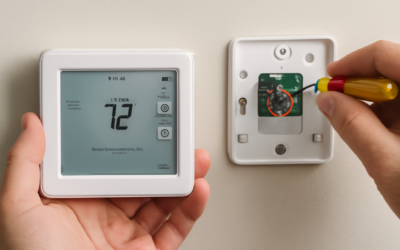
Most homeowners never see the honeywell home elitepro s1200 smart thermostat on a retail shelf, and that is by design. This is a contractor-grade unit built for HVAC professionals to install during a service call or system upgrade, not a grab-and-go box from the hardware aisle. The honeywell home elitepro s1200 smart thermostat pairs the connected features homeowners want, like phone control and smart scheduling, with the wiring flexibility that technicians need to handle complex heating and cooling equipment. If your installer recommended one, or you spotted it after a system replacement, here is what it actually does and why it costs what it does.
What Sets the ElitePRO S1200 Apart
The S1200 sits in Honeywell’s professional installer line rather than the consumer T-series you find at big-box stores. Where a retail thermostat is engineered so a homeowner can swap it in 20 minutes, the ElitePRO is engineered so a technician can configure it for nearly any residential system, including multi-stage heat pumps, dual-fuel setups, and systems with humidification or dehumidification. It typically drives up to a couple of heating stages and two cooling stages, which covers the overwhelming majority of homes.
The trade-off is intent. You are paying for a device that installs cleanly on equipment a basic thermostat would choke on. That is why you rarely price it yourself; it usually arrives bundled into a service quote.
Connected Features Homeowners Actually Use
Once it is on the wall and joined to your Wi-Fi, the S1200 behaves like the smart thermostats you already know. You get a bright touchscreen, app control from anywhere, and the everyday conveniences that make a connected stat worth the upgrade:
- Flexible scheduling — set different temperatures for wake, leave, return, and sleep, with separate weekday and weekend programs.
- Geofencing — the app uses your phone’s location to ease off heating or cooling when the house is empty and warm or cool it back up as you head home.
- Remote control — adjust the setpoint from bed, the office, or a hotel room the night before you get back from vacation.
- Alerts — extreme-temperature warnings, filter-change reminders, and lost-heating notifications that can catch a failure before pipes freeze.
- Voice control — works with Amazon Alexa and Google Assistant so you can change the temperature hands-free.
Filter and service reminders are more than a gimmick. A neglected one-inch filter is one of the most common reasons an air handler struggles, and a nudge every 90 days keeps airflow where it should be.
The C-Wire Question
Smart thermostats draw continuous power to keep the screen lit, the Wi-Fi radio alive, and the processor running. That power comes from the C-wire, or common wire, a dedicated conductor back to your furnace or air handler control board. Older homes wired in the 1970s through the early 2000s frequently ran only four or five thermostat wires with no dedicated common, which is exactly where DIY smart-thermostat projects go sideways.
This is a real advantage of a professional install. A technician either confirms you already have a spare conductor to repurpose as a C-wire, adds one, or wires in an add-a-wire adapter at the equipment. They also verify the transformer is sized correctly so the thermostat gets stable power. When the S1200 is installed by a pro, the C-wire headache is solved before you ever touch the screen.
HVAC Compatibility
Compatibility is where this thermostat earns its keep. It is designed to run conventional gas, oil, and electric systems as well as heat pumps, including two-stage and dual-fuel configurations that switch between a heat pump and a gas furnace based on outdoor temperature. That breadth matters in mixed-climate regions where a straight single-stage stat would leave efficiency on the table.
It also supports accessories many basic thermostats ignore, such as a whole-home humidifier or dehumidifier and, on capable systems, ventilation control. For a homeowner, the practical upshot is simple: one thermostat manages comfort and indoor humidity together instead of you juggling a separate humidistat.
Price and What You Get
Sold on its own, an ElitePRO-class Honeywell smart thermostat generally runs in the $150 to $200 range for the hardware. But because it is a pro-install product, most people encounter it as a line item on an HVAC invoice, where labor pushes the installed total to roughly $250 to $400 depending on whether a C-wire needs to be added and how complex the system is.
Compared with buying a retail smart thermostat and paying separately for a “no C-wire” workaround or an electrician, a bundled pro install is often competitive once you account for the guaranteed compatibility and the fact that someone else owns the wiring risk.
Installation, Step by Step
You will not be doing this yourself, but knowing the sequence helps you understand the service call:
- Power down the HVAC system at the breaker or service switch for safety.
- Remove the old thermostat and photograph or label every wire terminal before disconnecting.
- Confirm or establish a C-wire, adding a conductor or adapter if the existing bundle lacks one.
- Mount the new backplate, level it, and land each wire on the correct terminal.
- Restore power, walk through the on-screen setup, and select the equipment type and staging.
- Connect to Wi-Fi, register the device in the Honeywell Home app, and run a heat and cool test cycle.
A straightforward swap takes a technician 30 to 45 minutes. Adding a C-wire or configuring dual-fuel staging can extend that to well over an hour.
Pro Tips to Get the Most From It
Set your schedule around real habits, not aspirations. If nobody is up before 6:30 a.m., do not tell the system to hit 70°F at 5:45; you will just burn energy heating an empty house. Enable geofencing only after the app has learned your location reliably for a few days, and give at least one household member’s phone location permission so an empty-house setback actually triggers.
Keep the firmware current through the app, and register the reminder for a filter swap every one to three months depending on filter thickness. If you have pets or allergies, lean toward the shorter interval.
Energy Savings You Can Expect
A smart thermostat only saves money if you let it work. The Department of Energy has long estimated that setting a thermostat back 7 to 10°F for eight hours a day, typically while you sleep or are at work, can trim roughly 10 percent off annual heating and cooling costs. On a household that spends $1,600 a year on HVAC, that is around $160 back in your pocket, and the S1200’s scheduling plus geofencing is built to capture exactly that setback automatically.
Multi-stage support squeezes out a little more. On a two-stage furnace or heat pump, the thermostat can run the quieter, more efficient first stage most of the time and only call the second stage when the temperature gap is large, such as during a cold snap. That reduces short-cycling, evens out room temperature, and takes some wear off the equipment over a heating season.
Maintenance and Troubleshooting
Day to day, the S1200 asks very little of you. Keep it on current firmware through the app, respond to the filter reminder, and make sure the interior stays out of direct sunlight, which can trick the temperature sensor into reading warm. If the screen ever goes dark, the culprit is almost always power: a tripped breaker, a blown low-voltage fuse on the furnace board, or a loose C-wire.
Because this is a professionally installed unit, a persistent power or staging problem is worth a call back to your HVAC contractor rather than a DIY teardown. Most warranty coverage on pro-line Honeywell thermostats runs through the installing dealer, so keep your install paperwork; it is your fastest path to a no-charge fix if the hardware fails early.
How It Compares to the T9 and T10
Honeywell’s retail flagships, the T9 and T10 Pro, share the app ecosystem and add optional wireless room sensors that let the system prioritize comfort in the rooms you are actually using. If sensor-based multi-room balancing is your top priority, those models deliver it out of the box. The ElitePRO S1200, by contrast, is aimed at clean professional installation and broad equipment support rather than room-sensor gimmickry.
For most homeowners the decision is made for you: if a contractor is replacing your system, the S1200 they install will handle your equipment and give you the connected features that matter day to day. If you are shopping retail and want remote room sensors, look at the T9 or T10 instead. Either way, the honeywell home elitepro s1200 smart thermostat remains a solid, professionally installed choice that trades shelf appeal for wiring flexibility and rock-solid compatibility.